Emacs Literate Configuration
This is the epicenter of every Emacs user's life it seems. Whether literate or not, the init.el .emacs or the config.el or I guess config.org file is an ever evolving, always huge, file that defines the behaviors which your personal Emacs configuration uses when it starts up.
My Setup
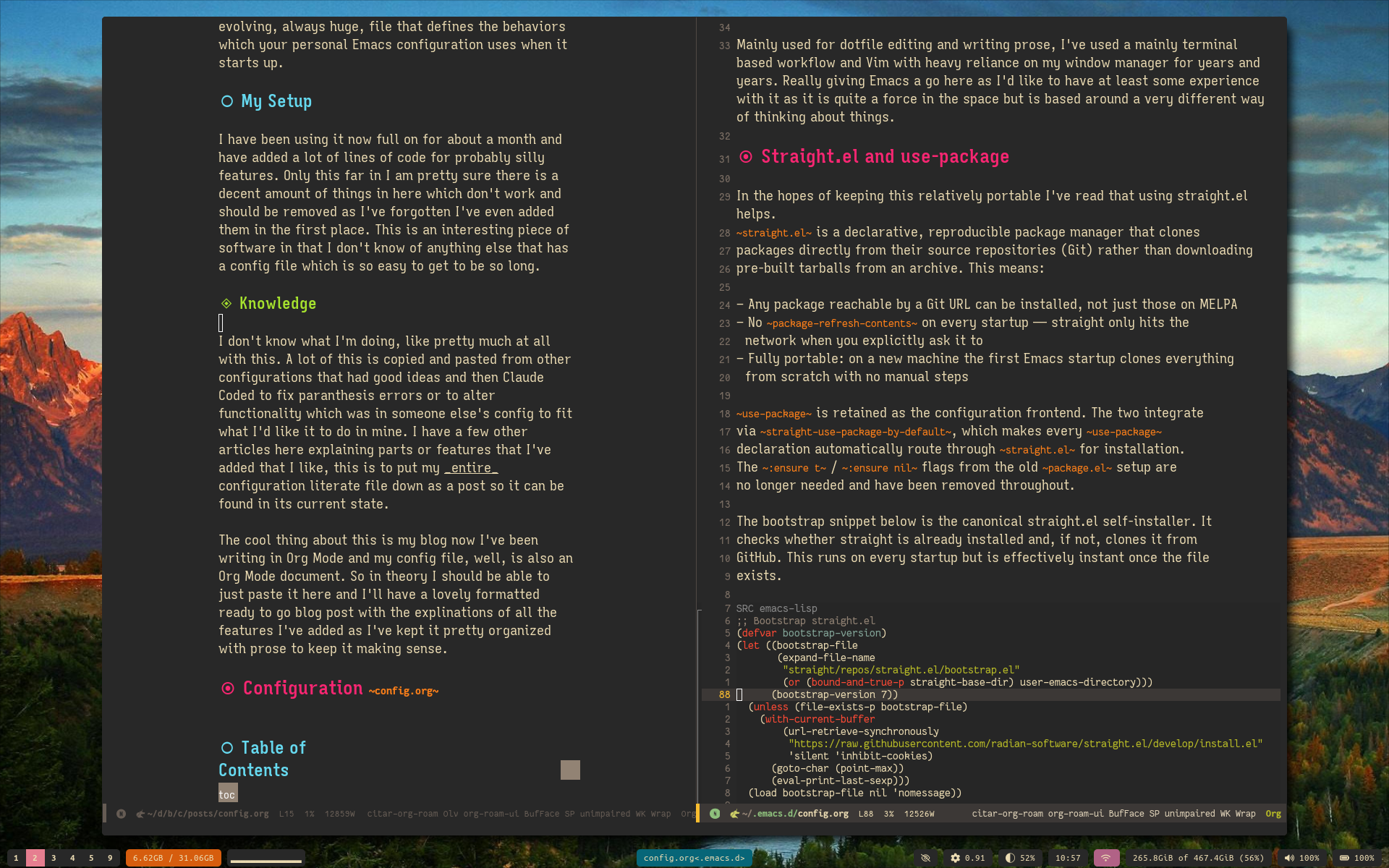
I have been using it now full on for about a month and have added a lot of lines of code for probably silly features. Only this far in I am pretty sure there is a decent amount of things in here which don't work and should be removed as I've forgotten I've even added them in the first place. This is an interesting piece of software in that I don't know of anything else that has a config file which is so easy to get to be so long.
Knowledge
I don't know what I'm doing, like pretty much at all with this. A lot of this is copied and pasted from other configurations that had good ideas and then Claude Coded to fix paranthesis errors or to alter functionality which was in someone else's config to fit what I'd like it to do in mine. I have a few other articles here explaining parts or features that I've added that I like, this is to put my entire configuration literate file down as a post so it can be found in its current state.
The cool thing about this is my blog now I've been writing in Org Mode and my config file, well, is also an Org Mode document. So in theory I should be able to just paste it here and I'll have a lovely formatted ready to go blog post with the explinations of all the features I've added as I've kept it pretty organized with prose to keep it making sense.
Configuration config.org
Goals
Mainly used for dotfile editing and writing prose, I've used a mainly terminal based workflow and Vim with heavy reliance on my window manager for years and years. Really giving Emacs a go here as I'd like to have at least some experience with it as it is quite a force in the space but is based around a very different way of thinking about things.
Straight.el and use-package
In the hopes of keeping this relatively portable I've read that using straight.el helps.
straight.el is a declarative, reproducible package manager that clones
packages directly from their source repositories (Git) rather than downloading
pre-built tarballs from an archive. This means:
- Any package reachable by a Git URL can be installed, not just those on MELPA
- No
package-refresh-contentson every startup — straight only hits the network when you explicitly ask it to - Fully portable: on a new machine the first Emacs startup clones everything from scratch with no manual steps
use-package is retained as the configuration frontend. The two integrate
via straight-use-package-by-default, which makes every use-package
declaration automatically route through straight.el for installation.
The :ensure t / :ensure nil flags from the old package.el setup are
no longer needed and have been removed throughout.
The bootstrap snippet below is the canonical straight.el self-installer. It checks whether straight is already installed and, if not, clones it from GitHub. This runs on every startup but is effectively instant once the file exists.
;; Bootstrap straight.el
(defvar bootstrap-version)
(let ((bootstrap-file
       (expand-file-name
        "straight/repos/straight.el/bootstrap.el"
        (or (bound-and-true-p straight-base-dir) user-emacs-directory)))
      (bootstrap-version 7))
  (unless (file-exists-p bootstrap-file)
    (with-current-buffer
        (url-retrieve-synchronously
         "https://raw.githubusercontent.com/radian-software/straight.el/develop/install.el"
         'silent 'inhibit-cookies)
      (goto-char (point-max))
      (eval-print-last-sexp)))
  (load bootstrap-file nil 'nomessage))

;; Tell straight.el to use use-package as its declaration frontend.
;; straight-use-package-by-default means every use-package form will
;; automatically install via straight without needing :straight t each time.
(straight-use-package 'use-package)
(setq straight-use-package-by-default t)
Tidy filesystem
Keep backup and auto-save files out of the way in a central location.
;; Redirect backup files (file~) to a central directory
(setq backup-directory-alist '(("." . "~/.emacs.d/backups")))
(setq backup-by-copying t)

;; Redirect auto-save files (#file#) to /tmp
(setq auto-save-file-name-transforms
      '((".*" "/tmp/" t)))
UI Cleanup
Some clean up or behavior things which are more or less built in settings I just prefer this way over another.
  (tool-bar-mode -1)
  (menu-bar-mode -1)
  (scroll-bar-mode -1)
  (setq scroll-step 1
        scroll-conservatively 101
        scroll-margin 5
        auto-window-vscroll nil
        fast-but-imprecise-scrolling t
        scroll-preserve-screen-position t)
  (pixel-scroll-precision-mode 1)
  (global-hl-line-mode 1)
Dashboard
dashboard provides a startup screen shown whenever a new frame is opened via
emacsclient -c. Three sections are shown: recent files for quick access to
recent work, help pages for quick access to built-in documentation, and custom
layout launchers for jumping directly into a configured workspace.
initial-buffer-choice is set to the dashboard buffer so that new frames opened
via emacsclient -c land here instead of the scratch buffer.
  (use-package dashboard
    :init
    (dashboard-setup-startup-hook)
    :custom
    (dashboard-startup-banner 'logo)
    (dashboard-center-content t)
    (dashboard-vertically-center-content t)
    (dashboard-items '((recents  . 7)
                       (bookmarks . 3)
                       (registers . 3)))
    (dashboard-item-names '(("Recent Files:"  . "Recent Files:")
                             ("Bookmarks:"     . "Help Pages:")
                             ("Registers:"     . "Workspaces:")))
    (dashboard-display-icons-p nil)
    (dashboard-set-heading-icons nil)
    (dashboard-set-file-icons nil))

  ;; Populate bookmarks with help pages
  (setq bookmark-alist
        '(("Emacs Manual"      . ((filename . "info:emacs")))
          ("Elisp Manual"      . ((filename . "info:elisp")))
          ("Org Manual"        . ((filename . "info:org")))))

  ;; Populate registers with workspace launchers
  (set-register ?d '(file . "my/open-dotfiles"))
  (set-register ?b '(file . "my/open-blog"))

  ;; Custom register section renderer
  (defun dashboard-insert-registers (list-size)
    "Insert workspace launcher entries into the dashboard."
    (dashboard-insert-heading "Workspaces:" nil)
    (insert "\n")
    (dolist (entry '(("Dotfiles"     . my/open-dotfiles)
                     ("Blog"         . my/open-blog)))
      (let ((name (car entry))
            (fn   (cdr entry)))
        (insert "    ")
        (insert-button name
                       'action (lambda (_) (call-interactively fn))
                       'follow-link t
                       'help-echo (format "Open %s workspace" name))
        (insert "\n"))))

  (add-to-list 'dashboard-item-generators
               '(registers . dashboard-insert-registers))

  (setq initial-buffer-choice
        (lambda () (get-buffer-create "*dashboard*")))
(add-hook 'dashboard-mode-hook
          (lambda ()
            (display-line-numbers-mode 0)))
Silence
Disables the audible bell and the visual flash fallback that Emacs uses when the bell is muted. Without both settings Emacs will either beep through the system speaker or flash the frame depending on the desktop environment.
(setq ring-bell-function 'ignore)  ;; disable audible bell entirely
(setq visible-bell nil)            ;; disable the visual flash fallback
Fonts
Here we are playing around with the available fonts. So just for a note here are a few things which can be run in the scratch buffer to take effect across the whole system to try things out before actually applying them here in the config.
  ;;
  ;;(print (font-family-list)) This will print all available fonts in mini buffer
;;
  ;;(set-face-attribute 'variable-pitch nil :family "testAFont" :height 140)
  ;;(set-face-attribute 'fixed-pitch nil :family "Your Mono Font Name Here" :height 140)
variable-pitch is the proportional font used in org prose, help buffers,
markdown, LaTeX, and Typst. fixed-pitch is the monospace font inherited by
code blocks, line numbers, and the mode line. Both are set here in one place
so swapping fonts only ever requires changing a single block.
(set-face-attribute 'default nil        :family "Fantasque Sans Mono"     :height 120)
(set-face-attribute 'fixed-pitch nil    :family "Fantasque Sans Mono"     :height 120)
(set-face-attribute 'variable-pitch nil :family "Aporetic Serif" :height 140)
Small Changes for Big Effect
Somehow there isn't undo from the get go? Or there is but it is very 1970s in that it super tries to conserve ram or something and therefore isn't too practical. Next up is WhichKey which well, shows you the keys available for the next press. Very handy due to the sheer volume of things you can press in Emacs it seems.
    (use-package undo-fu)
  (use-package which-key
    :config
    (which-key-mode 1)
    :custom
    (which-key-idle-delay 0.5))
Telescope-like Fuzzy Finder
vertico provides the vertical completion UI, orderless enables fuzzy/space-separated
matching, marginalia adds annotations, and consult provides the search commands.
  (use-package vertico
    :config
    (vertico-mode 1))

  (use-package orderless
    :custom
    (completion-styles '(orderless basic))
    (completion-category-defaults nil)
    (completion-category-overrides '((file (styles basic partial-completion)))))

  (use-package marginalia
    :config
    (marginalia-mode))

  (use-package consult
    :demand t
    :bind
    (("C-p" . consult-buffer)
     ("C-f" . consult-ripgrep)
     ("C-s" . consult-line))
    :custom
    (consult-preview-key "M-.")
    :config
    (recentf-mode 1))
Icons
  (use-package nerd-icons
    :ensure t)
Mode Line (doom-modeline)
doom-modeline is a minimal, fast mode-line built on nerd-icons. It shows
the buffer name, major mode, Evil state, git branch, and diagnostics in a
clean single line.
doom-modeline-icon is set to nil here since we are not using glyphs or
powerline separators — this keeps it readable on any font without needing
a patched Nerd Font active on the mode-line specifically.
(use-package doom-modeline
  :init
  (doom-modeline-mode 1)
  :custom
  (doom-modeline-icon 1)              ;; no icons/glyphs, clean text only
  (doom-modeline-major-mode-icon t)   ;; no major mode icon
  (doom-modeline-time-icon t)   ;; no major mode icon
  (doom-modeline-height 26)             ;; slightly taller than default
  (doom-modeline-bar-width 5)           ;; left accent bar width
  (doom-modeline-buffer-file-name-style 'truncate-upto-project) ;; short but informative path
  (doom-modeline-minor-modes 1)       ;; hide minor mode clutter
  (doom-modeline-enable-word-count 1)
  (doom-modeline-buffer-encoding nil))  ;; hide UTF-8 noise
Syntax Highlighting
Non LSP based syntax highlighting for the main languages on my machine .
Nix Syntax
nix-mode provides font-lock syntax highlighting for .nix files with no
LSP or language server required. Keywords, strings, builtins, interpolation,
and comments all get distinct colours drawn from the active theme.
(use-package nix-mode
  :mode "\\.nix\\'")
Markdown
(use-package markdown-mode
  :mode ("\\.md\\'" "\\.markdown\\'"))
Help Buffer Appearance
Enables syntax highlighting in *Help* buffers so function documentation renders
with the same font-lock colours as source files. help-mode already uses
font-lock-mode internally — (add-hook 'help-mode-hook #'font-lock-mode) simply
ensures it is always active.
variable-pitch-mode in help-mode-hook applies the same proportional font to
help prose that org-mode uses for its prose sections, while code samples and
keybind listings in help buffers inherit fixed-pitch through their existing
faces, keeping them monospace.
(add-hook 'help-mode-hook #'variable-pitch-mode)
(add-hook 'help-mode-hook #'font-lock-mode)
Relative Line Numbers
The keys to a stable gutter width are:
- Set
display-line-numbers-widthglobally as a default BEFORE the mode enables. - Set
display-line-numbers-right-justifytotso numbers are right-aligned within the fixed-width gutter. Without this, numbers are left-aligned and the text body shifts sideways whenever the relative number gains or loses a digit as the cursor moves. - In org-mode, re-assert the width AFTER
variable-pitch-modefires, because proportional fonts cause Emacs to recalculate gutter metrics. We do this by appending to the hook (thetargument toadd-hook) so it runs last.
  (setq-default display-line-numbers-type 'relative)
  (setq-default display-line-numbers-width 4)  ;; 4 = 3 digit columns + 1 padding so
                                                ;; two-digit numbers never reflow the gutter
  (setq-default display-line-numbers-right-justify t) ;; right-align numbers so the text
                                                       ;; body stays anchored as digits change
  (global-display-line-numbers-mode t)

  (dolist (mode '(term-mode-hook
                  shell-mode-hook
                  eshell-mode-hook
                  vterm-mode-hook
                  treemacs-mode-hook
                  minibuffer-setup-hook))
    (add-hook mode (lambda () (display-line-numbers-mode 0))))

  ;; Re-assert fixed gutter width in org-mode AFTER variable-pitch-mode fires.
  ;; The trailing `t` appends this hook so it runs after all others on the hook list.
  (add-hook 'org-mode-hook
            (lambda ()
              (setq-local display-line-numbers-width 4)
              (setq-local display-line-numbers-width-start nil))
            t)
(custom-set-faces
 '(line-number               ((t (:inherit fixed-pitch))))
 '(line-number-current-line  ((t (:inherit fixed-pitch)))))
Theme
(use-package doom-themes
  :custom
  (custom-safe-themes t)
  :config
  (load-theme 'doom-tomorrow-night t))
Theme Toggle
Toggles between the dark theme (doom-monokai-machine) and the light theme
(ef-cyprus). C-c T is used because C-c t is already bound to the eshell toggle.
ef-cyprus is part of the ef-themes package by Protesilaos Stavrou. The toggle
tracks the current state via a simple variable so repeated presses always flip
between exactly the two themes and nothing else.
Because the org-block face background is not set by most themes — they leave it
to the user — we re-apply it explicitly after each toggle via
my/apply-org-theme-faces. This ensures code blocks always have an appropriate
tinted background on both dark and light themes rather than a jarring mismatch.
  (use-package ef-themes
    :custom
    (custom-safe-themes t))

  (defvar my/dark-theme  'doom-monokai-machine
    "The dark theme to use in `my/toggle-theme'.")

  (defvar my/light-theme 'ef-cyprus
    "The light theme to use in `my/toggle-theme'.")

  (defvar my/current-theme 'dark
    "Tracks which theme is active: the symbol `dark' or `light'.")

  (defun my/apply-org-theme-faces ()
    "Re-apply org code-block faces relative to the active theme background.
  Skips safely when no real color is available (e.g. daemon startup)."
    (let* ((bg (face-background 'default nil t)))
      (when (and bg
                 (not (string= bg "unspecified-bg"))
                 (not (string= bg "unspecified-fg")))
        (let* ((block-bg (if (eq my/current-theme 'dark)
                             (color-darken-name bg 4)
                           (color-darken-name bg 3)))
               (comment (if (eq my/current-theme 'dark) "#888888" "#999988")))
          (custom-set-faces
           `(org-block            ((t (:inherit fixed-pitch :background ,block-bg))))
           `(org-block-begin-line ((t (:inherit fixed-pitch :foreground ,comment
                                       :background ,block-bg))))
           `(org-block-end-line   ((t (:inherit fixed-pitch :foreground ,comment
                                       :background ,block-bg))))
           `(org-code             ((t (:inherit fixed-pitch)))))))))

  ;; Apply org faces once a real graphical frame is available
  (add-hook 'server-after-make-frame-hook #'my/apply-org-theme-faces)

  (defun my/toggle-theme ()
    "Toggle between `my/dark-theme' and `my/light-theme'."
    (interactive)
    (if (eq my/current-theme 'dark)
        (progn
          (mapc #'disable-theme custom-enabled-themes)
          (load-theme my/light-theme t)
          (setq my/current-theme 'light)
          (my/apply-org-theme-faces)
          (message "Switched to light theme: %s" my/light-theme))
      (progn
        (mapc #'disable-theme custom-enabled-themes)
        (load-theme my/dark-theme t)
        (setq my/current-theme 'dark)
        (my/apply-org-theme-faces)
        (message "Switched to dark theme: %s" my/dark-theme))))

  (global-set-key (kbd "C-c T") #'my/toggle-theme)
Dired / Dirvish
Yazi-style file navigation with previews and a cleaner display within DirEd.
  (use-package dirvish
    :ensure t
    :init
    (dirvish-override-dired-mode) ;; replace dired globally with dirvish
    :custom
    (dirvish-quick-access-entries
     '(("h" "~/" "home")
       ("d" "~/down/" "down")))
    (dirvish-attributes
     '(file-time file-size collapse subtree-state vc-state))
    (dirvish-preview-dispatchers
     '(image video audio epub pdf))
    :config
    (setq dired-listing-switches
          "-l --almost-all --human-readable --group-directories-first --no-group")
    :bind
    (("C-c f" . dirvish)
     :map dirvish-mode-map
     ("a"   . dirvish-quick-access)
     ("f"   . dirvish-file-info-menu)
     ("y"   . dirvish-yank-menu)
     ("N"   . dirvish-narrow)
     ("^"   . dirvish-history-last)
     ("h"   . dirvish-history-jump)
     ("s"   . dirvish-quicksort)
     ("TAB" . dirvish-subtree-toggle)
     ("M-n" . dirvish-history-go-forward)
     ("M-p" . dirvish-history-go-backward)
     ("M-l" . dirvish-ls-switches-menu)
     ("M-m" . dirvish-mark-menu)
     ("M-f" . dirvish-toggle-fullscreen)))
(setq dirvish-default-layout '(1 0.11 0.55))
#+end_src
Editing
Here I have things such as Evil (vim) mode, completion, and other editing related tweaks.
Magit
Git interface for Emacs. Provides a full featured git client within Emacs
with a clean buffer based interface. SPC g g opens the status buffer from
anywhere.
  (use-package magit)

    (with-eval-after-load 'evil
      (evil-define-key 'normal 'global (kbd "<leader>gg") #'magit-status)
      (evil-define-key 'normal 'global (kbd "<leader>gb") #'magit-blame)
      (evil-define-key 'normal 'global (kbd "<leader>gl") #'magit-log-current))
Evil
(use-package evil
  :init
  (setq evil-want-integration t
        evil-want-keybinding nil)  ;; required when using evil-collection
  :config
  (evil-mode 1))

(use-package evil-collection
  :after evil
  :config
  (evil-collection-init))
Smartparens
Auto-close pairs with smart heuristics to avoid false triggers.
(use-package smartparens
  :ensure t
  :hook (prog-mode text-mode org-mode)
  :config
  (require 'smartparens-config) ;; loads sane defaults for many major modes
  (sp-local-pair 'org-mode "*" "*")
  (sp-local-pair 'org-mode "/" "/"))
Corfu Completion
Non LSP based completion that works in all buffers. Popular package that leverages built in things Emacs is already doing.
  (use-package corfu
    :custom
    (corfu-auto t)           ;; show popup automatically without pressing TAB
    (corfu-auto-delay 0.1)   ;; seconds before popup appears
    (corfu-auto-prefix 2)    ;; minimum characters before popup triggers
    (corfu-cycle t)          ;; wrap around at top/bottom of candidate list
    (corfu-quit-no-match t)  ;; hide popup if nothing matches
    :config
    (global-corfu-mode 1))
 (with-eval-after-load 'corfu
  (define-key corfu-map (kbd "ESC") #'corfu-quit))
Spelling
This has been a huge pain mainly due to NixOS's funky system paths. Here we go again with Aspell
Disable spelling entirely
Because this keeps not working, this code block entirely disables the whole thing so there aren't obnoxious errors when moving on after frustration lol.
(with-eval-after-load 'flyspell
  (setq ispell-program-name "aspell"
        ispell-dictionary "en_US"
        flyspell-issue-message-flag nil))

(defun my/toggle-spellcheck ()
  "Toggle flyspell on and off."
  (interactive)
  (if (bound-and-true-p flyspell-mode)
      (progn
        (flyspell-mode -1)
        (message "Spellcheck off."))
    (progn
      (flyspell-mode 1)
      (flyspell-buffer)
      (message "Spellcheck on."))))

(defun my/flyspell-goto-prev-error ()
  "Jump to the previous flyspell error."
  (interactive)
  (flyspell-goto-next-error t))

(with-eval-after-load 'evil
  (evil-define-key 'normal 'global (kbd "<leader>ts") #'my/toggle-spellcheck)
  (evil-define-key 'normal 'global (kbd "]s") #'flyspell-goto-next-error)
  (evil-define-key 'normal 'global (kbd "[s") #'my/flyspell-goto-prev-error))
Zen Mode (olivetti — no fullscreen)
(use-package olivetti
  :ensure t
  :config
  (defun my/zen-mode ()
    "Toggle a distraction-free writing mode without fullscreening Emacs."
    (interactive)
    (if (bound-and-true-p olivetti-mode)
        (progn
          (olivetti-mode -1)
          (display-line-numbers-mode 1))
      (progn
        (olivetti-mode 1)
        (olivetti-set-width 0.60)  ;; 65% of window width, auto-centers
        (display-line-numbers-mode 0))))
  :bind
  ("C-c z" . my/zen-mode))
Text Wrapping / Word-Processor Behavior
  (defun my/text-mode-line-wrapping ()
    "Enable word-wrapping like a word processor."
    (visual-line-mode 1)
    (setq truncate-lines nil))
    ;; Optional: uncomment for hard breaks
    ;; (setq fill-column 80)
    ;; (auto-fill-mode 1)

  (dolist (hook '(typst-mode-hook
                  org-mode-hook
                  markdown-mode-hook
                  latex-mode-hook))
    (add-hook hook #'my/text-mode-line-wrapping))
(dolist (hook '(typst-mode-hook
                markdown-mode-hook
                latex-mode-hook
                LaTeX-mode-hook))
  (add-hook hook #'variable-pitch-mode))
Org Mode
Headings use a palette drawn from doom-monokai-machine's own accent colours so everything feels native to the theme. The colours chosen are:
- Level 1
#F92672— pink/red, high visual weight for top-level headings- Level 2
#66D9EF— cyan, distinct from level 1 at a glance- Level 3
#A6E22E— green- Level 4
#E6DB74— yellow- Level 5
#FD971F— orange- Level 6
#AE81FF— purple- Level 7 / 8
- muted grey, de-emphasised since deep nesting is rare
Other coloured elements:
org-todo/org-done— red and green keyword labelsorg-date— cyan timestamp linksorg-tag— muted orange tagsorg-link— cyan underlined linksorg-list-dt— yellow definition-list termsorg-document-title— large white bold title at the top of the fileorg-document-info— muted grey for #+AUTHOR, #+DATE etc.
      (use-package org
        :straight (:type built-in)  ;; tell straight to use Emacs' built-in org rather than
                                     ;; cloning from MELPA, avoiding version conflicts
        :hook
        ((org-mode . variable-pitch-mode)
         (org-mode . visual-line-mode))
        :custom-face
        ;; Headings — height + weight carried over, foreground colours added
        (org-level-1 ((t (:height 1.4 :weight bold  :foreground "#F92672"))))
        (org-level-2 ((t (:height 1.3 :weight bold  :foreground "#66D9EF"))))
        (org-level-3 ((t (:height 1.2 :weight bold  :foreground "#A6E22E"))))
        (org-level-4 ((t (:height 1.1 :weight bold  :foreground "#E6DB74"))))
        (org-level-5 ((t (:height 1.05             :foreground "#FD971F"))))
        (org-level-6 ((t (:height 1.02             :foreground "#AE81FF"))))
        (org-level-7 ((t (:height 1.0              :foreground "#75715E"))))
        (org-level-8 ((t (:height 1.0              :foreground "#75715E"))))
        ;; Code blocks — background is intentionally unset here so it inherits from
        ;; the active theme. my/apply-org-theme-faces re-applies theme-appropriate
        ;; colours whenever the theme is toggled (see Theme Toggle section).
        (org-block            ((t (:inherit fixed-pitch))))
        (org-block-begin-line ((t (:inherit fixed-pitch))))
        (org-block-end-line   ((t (:inherit fixed-pitch))))
        (org-code             ((t (:inherit fixed-pitch))))
        ;; Todo keywords
        (org-todo ((t (:foreground "#F92672" :weight bold))))
        (org-done ((t (:foreground "#A6E22E" :weight bold))))
        ;; Timestamps, tags, links
        (org-date ((t (:foreground "#66D9EF" :underline t))))
        (org-tag  ((t (:foreground "#FD971F" :weight normal))))
        (org-link ((t (:foreground "#66D9EF" :underline t))))
        ;; Definition list terms
        (org-list-dt ((t (:foreground "#E6DB74" :weight bold))))
        ;; Document title and info lines (#+TITLE, #+AUTHOR etc.)
        (org-document-title ((t (:height 1.5 :weight bold :foreground "#F8F8F2"))))
        (org-document-info  ((t (:foreground "#75715E")))))
        :custom
        (setq org-agenda-files '("~/dox/roam"))

  (use-package org-modern
    :after org
    :hook
    (org-mode . org-modern-mode)
    :custom
    (org-modern-star '("◉" "○" "✸" "✿" "✤" "✦" "▶" "▷"))
    (org-modern-list '((45 . "–") (43 . "•") (42 . "◦")))
    (org-modern-checkbox '((88 . "✔") (45 . "◐") (32 . "○"))))
  (use-package toc-org
    :hook (org-mode . toc-org-mode))
Org-Roam
Strange second brain style of taking notes in an interconnected web of weirdness?
  (use-package org-roam
    :ensure t
    :init
    (setq org-roam-v2-ack t)
    :custom
    (org-roam-directory "~/dox/roam")
    (org-roam-completion-everywhere t)
    (org-roam-capture-templates
     '(("d" "default" plain
        "%?"
        :if-new (file+head "%<%Y%m%d%H%M%S>-${slug}.org" "#+title: ${title}\n")
        :unnarrowed t))
     ("p" "project" plain "* Goals\n\n%?\n\n* Tasks\n\n** TODO Add initial tasks\n\n* Dates\n\n"
      :if-new (file+head "%<%Y%m%d%H%M%S>-${slug}.org" "#+title: ${title}\n#+filetags: Project")
      :unnarrowed t))
    :bind
    (("C-c n l" . org-roam-buffer-toggle)
     ("C-c n f" . org-roam-node-find)
     ("C-c n i" . org-roam-node-insert)
     :map org-mode-map
     ("C-c n a" . completion-at-point))
    :bind-keymap
    ("C-c n d" . org-roam-dailies-map)
    :config
    (org-roam-db-autosync-mode))
(setq org-roam-dailies-directory "journal/")
Citar and Zotero Integration
Reads the Better BibTeX auto-exported library from Zotero and integrates
it with Org Roam via citar-org-roam. The bib file is updated automatically
by Zotero whenever you save something with the browser connector.
(use-package citar
  :after org
  :custom
  (citar-bibliography '("~/dox/bibtex/refs.bib"))
  (citar-notes-paths '("~/dox/roam"))
  (citar-open-always-create-notes nil)
  :bind
  (("C-c n b" . citar-open)
   ("C-c n B" . citar-insert-citation)
   :map org-mode-map
   ("C-c n r" . citar-insert-reference)))

(use-package citar-org-roam
  :after (citar org-roam)
  :config
  (citar-org-roam-mode)
  (setq citar-org-roam-note-title-template "${author} - ${title}"))
Org Roam UI
Visual representation of the web of notes in an interactive web GUi.
(use-package org-roam-ui
  :straight
  (:host github :repo "org-roam/org-roam-ui" :branch "main" :files ("*.el" "out"))
  :after org-roam
  :config
  (setq org-roam-ui-sync-theme t
        org-roam-ui-follow t
        org-roam-ui-update-on-save t
        org-roam-ui-open-on-start t
        browse-url-browser-function
        (lambda (url &rest args)
          (if (string-match-p "localhost" url)
              (browse-url-generic url)
            (browse-url-default-browser url)))
        browse-url-generic-program "qutebrowser")
  :bind (("C-c n o" . org-roam-ui-open)
         ("C-c n u" . org-roam-ui-mode)))
Shrink Path
(use-package shrink-path)Config Reload
C-c r tangles config.org to config.el and hot-reloads it without restarting Emacs.
How it works:
org-babel-tangle-filewrites a freshconfig.elfrom the org source blocks.load-fileevaluates that file in the running Emacs session, applying every change immediately.- The function is bound globally so it works from any buffer, not just when
config.orgis open.
One thing to be aware of: a hot-reload re-evaluates the whole file, which is fine
for settings and keybinds. Packages that were already loaded won't be unloaded —
use-package will simply skip them as already-present, which is the correct
behaviour. If you ever add a brand new package and C-c r doesn't install it,
a single restart will sort it out.
(defun my/reload-config ()
  "Tangle config.org to config.el and reload it without restarting Emacs."
  (interactive)
  (let ((org-file (expand-file-name "config.org" user-emacs-directory))
        (el-file  (expand-file-name "config.el"  user-emacs-directory)))
    ;; Delete the existing config.el before tangling so stale blocks from
    ;; previous versions of the config are never silently carried forward.
    (when (file-exists-p el-file)
      (delete-file el-file))
    (org-babel-tangle-file org-file el-file "emacs-lisp")
    (load-file el-file)
    (message "Config reloaded successfully.")))

(global-set-key (kbd "C-c r") #'my/reload-config)
System Clipboard
Makes the "+" and "*" registers in Evil behave exactly like they do in Neovim —
"+p pastes from the system clipboard and "+y yanks into it.
In Neovim this works because Neovim talks to the OS clipboard directly. Emacs has its own internal kill-ring that is separate from the system clipboard by default. The two settings below bridge that gap:
select-enable-clipboard tmakes every Emacs yank/kill also write to the OS clipboard, mirroring Neovim'sclipboard=unnamed.select-enable-primary tadditionally syncs the X11 primary selection (the middle-click buffer on Linux). Remove this line if you are on macOS or Windows, or if you find it interferes with other workflows.evil-want-clipboard t(set in:initbefore Evil loads) tells Evil to route all yank and delete operations through the"+"register by default, exactly matching Neovim'sclipboard+=unnamedplus.
The xclip package is used as the backend on Linux because Emacs running inside a
terminal otherwise cannot reach the graphical clipboard. If you are running Emacs
as a GUI application (emacs rather than emacs -nw) it will still work correctly —
xclip simply becomes a no-op in that context. On macOS the built-in pbcopy~/~pbpaste
integration is used automatically and xclip is skipped.
;; Bridge Emacs kill-ring to the OS clipboard
(setq select-enable-clipboard t)
(setq select-enable-primary nil)
(setq evil-want-clipboard t)

(when (executable-find "wl-copy")
  (setq wl-copy-process nil)
  (defun wl-copy (text)
    (setq wl-copy-process
          (make-process :name "wl-copy"
                        :buffer nil
                        :command '("wl-copy" "-f" "-n")
                        :connection-type 'pipe
                        :noquery t))
    (process-send-string wl-copy-process text)
    (process-send-eof wl-copy-process))
  (defun wl-paste ()
    (if (and wl-copy-process
             (process-live-p wl-copy-process))
        nil
      (shell-command-to-string "wl-paste -n | tr -d \n")))
  (setq interprogram-cut-function #'wl-copy)
  (setq interprogram-paste-function #'wl-paste))
Keybinds
Window Focus (navigate between splits)
Emacs calls splits "windows". These binds follow the Vim hjkl convention exactly:
h left, l right, j down, k up — so they transfer directly from Evil muscle memory.
C-c h/j/k/l do not conflict with any default Emacs bindings. The C-c prefix
followed by a plain letter is reserved by Emacs for user-defined keys, so this is
the correct namespace to use.
(global-set-key (kbd "C-c h") #'windmove-left)
(global-set-key (kbd "C-c l") #'windmove-right)
(global-set-key (kbd "C-c j") #'windmove-down)
(global-set-key (kbd "C-c k") #'windmove-up)
Window Movement (swap pane positions)
These move the contents of the current window in the given direction, swapping
it with whichever window is adjacent. Uses windmove-swap-states-*, which is
built into Emacs 27+.
(global-set-key (kbd "C-c m h") #'windmove-swap-states-left)
(global-set-key (kbd "C-c m l") #'windmove-swap-states-right)
(global-set-key (kbd "C-c m j") #'windmove-swap-states-down)
(global-set-key (kbd "C-c m k") #'windmove-swap-states-up)
Terminal (eshell in a bottom split)
Opens an eshell in a horizontal split occupying the bottom third of the current
frame. If an eshell buffer is already open it reuses it rather than opening a
second one. Pressing C-c t again from any window closes the eshell split and
returns focus to the window you were in.
(defun my/toggle-eshell-bottom ()
  "Toggle an eshell in a horizontal split at the bottom third of the frame."
  (interactive)
  (let* ((eshell-buf-name "*eshell*")
         (existing-win (get-buffer-window eshell-buf-name)))
    (if existing-win
        ;; If eshell window is already visible, close it and return focus
        (progn
          (delete-window existing-win)
          (message "Eshell closed."))
      ;; Otherwise open a new split sized to one third of the frame height
      (let* ((total-height (frame-height))
             (shell-height (max 10 (/ total-height 4)))
             (new-win (split-window-below (- total-height shell-height))))
        (select-window new-win)
        (if (get-buffer eshell-buf-name)
            (switch-to-buffer eshell-buf-name)
          (eshell))))))

(global-set-key (kbd "C-c t") #'my/toggle-eshell-bottom)
Close Window
Closes the currently focused split. Emacs' built-in delete-window is used
directly — C-c x is an unoccupied user key in the default bindings.
(global-set-key (kbd "C-c x") #'delete-window)Zen Mode
Exposes my/zen-mode (defined in the Zen Mode section) on a dedicated keybind so
it can be toggled from any buffer without going through M-x. C-c g is used here
because C-c C-g is reserved by Emacs as a universal quit/abort chord and cannot
be safely rebound.
(global-set-key (kbd "C-c g") #'my/zen-mode)Padding
Emacs has no single "padding" setting, so three separate mechanisms are combined to produce the effect:
internal-border-width— a frame-level property that adds a gap of5pxbetween the outer edge of the Emacs frame and the inner window area. This is the global outer padding and is set once on the default frame parameters.window-margins— per-window left and right gutters measured in character columns. Set to3columns on each side inside every window so text does not sit flush against the split border or the frame edge.header-line-format— normally used for a status bar at the top of a window. By setting it to a single space string it renders as a blank line, producing a top padding gap within each window. There is no built-in equivalent for bottom padding, but combined with the margins this breaks the flush appearance on all four sides.
All three are applied via window-configuration-change-hook so they reapply
automatically whenever a new split is created or a buffer is switched.
The header-line face is explicitly set to inherit the default background so it
renders as invisible padding rather than a visible grey bar. :box nil and
:underline nil remove any border the theme may add to the face.
;; (add-to-list 'default-frame-alist '(internal-border-width . 5))
;; (custom-set-faces
 ;; '(header-line ((t (:inherit default
                    ;; :background unspecified
                    ;; :foreground unspecified
                    ;; :box nil
                    ;; :underline nil)))))
;; (defun my/set-window-padding ()
  ;; "Add left/right margins and a blank header line to every window.
;; Excludes which-key, minibuffer, olivetti, and transient popup windows."
  ;; (walk-windows
   ;; (lambda (win)
     ;; (unless (or (window-minibuffer-p win)
                 ;; (string-prefix-p " *which-key*"
                                  ;; (buffer-name (window-buffer win)))
                 ;; (and (boundp 'olivetti-mode)
                      ;; (buffer-local-value 'olivetti-mode (window-buffer win))))
       ;; (set-window-margins win 3 3)
       ;; (with-current-buffer (window-buffer win)
         ;; (setq-local header-line-format " "))))
   ;; nil t))
;; (add-hook 'window-configuration-change-hook #'my/set-window-padding)
;; (my/set-window-padding)
Document Management
Below are the sections for editing different types of documents and the associated configurations to have nice viewing and the like.
PDF Tools
pdf-tools renders PDFs natively inside an Emacs buffer using a compiled
server process (epdfinfo). It is significantly sharper and more responsive
than the built-in doc-view, which rasterises pages to PNGs.
On first install, run M-x pdf-tools-install once to compile the server
binary. Most distros need libpoppler-glib-dev and libpoppler-private-dev
(Debian/Ubuntu) or poppler-glib (Arch/macOS Homebrew) for the build to
succeed.
  (use-package ox-reveal)
  (use-package pdf-tools
    :magic ("%PDF" . pdf-view-mode)  ;; open any PDF in pdf-view-mode automatically
    :config
    (pdf-tools-install :no-query))   ;; compile epdfinfo silently; no interactive prompt
Org → PDF Live Preview
Side-by-side Org + PDF workflow. C-c p o opens the preview, C-c p s stops it.
On every save the org file is re-exported via LaTeX and the PDF view refreshes
automatically. The LaTeX engine is lualatex — swap for pdflatex or xelatex
in org-latex-pdf-process if preferred.
(setq org-latex-pdf-process
      '("lualatex -interaction nonstopmode -output-directory %o %f"
        "lualatex -interaction nonstopmode -output-directory %o %f"
        "lualatex -interaction nonstopmode -output-directory %o %f"))

(defvar-local my/org-pdf-preview-active nil
  "Non-nil when the live PDF preview is running for this org buffer.")

(defvar-local my/org-pdf-preview--path nil
  "Cached PDF path for this org buffer, set when preview is opened.")

(defun my/org-pdf-preview--do-revert (pdf-path)
  "Revert the pdf-tools buffer visiting PDF-PATH if it exists."
  (let ((pdf-buf (find-buffer-visiting pdf-path)))
    (when (and pdf-buf (buffer-live-p pdf-buf))
      (with-current-buffer pdf-buf
        (pdf-view-revert-buffer nil t)))))

(defun my/org-pdf-preview--do-export (org-buf pdf-path)
  "Export ORG-BUF to PDF then schedule a revert of PDF-PATH."
  (when (buffer-live-p org-buf)
    (with-current-buffer org-buf
      (org-latex-export-to-pdf nil nil nil nil nil)))
  (run-with-timer 0.5 nil #'my/org-pdf-preview--do-revert pdf-path))

(defun my/org-pdf-preview-update ()
  "Re-export the current org buffer to PDF and refresh the pdf-tools window.
Intended to run on `after-save-hook' (buffer-local)."
  (when my/org-pdf-preview-active
    (run-with-timer 0 nil
                    #'my/org-pdf-preview--do-export
                    (current-buffer)
                    my/org-pdf-preview--path)))

(defun my/org-pdf-preview-open ()
  "Export the current org buffer to PDF and open it in a right-hand split.
Enables auto-refresh on save for this buffer."
  (interactive)
  (unless (buffer-file-name)
    (user-error "Buffer must be visiting a file before opening PDF preview"))
  (unless (eq major-mode 'org-mode)
    (user-error "PDF preview is only available in org-mode buffers"))
  (let* ((org-buf  (current-buffer))
         (pdf-path (concat (file-name-sans-extension (buffer-file-name)) ".pdf")))
    (message "Exporting to PDF…")
    (org-latex-export-to-pdf nil nil nil nil nil)
    (unless (file-exists-p pdf-path)
      (user-error "PDF export failed — check *Messages* for LaTeX errors"))
    (setq my/org-pdf-preview--path pdf-path)
    ;; Re-fetch the org window AFTER export — the export process can shift
    ;; which window is selected, making any pre-captured org-win stale.
    (let* ((org-win (get-buffer-window org-buf))
           (pdf-buf (or (find-buffer-visiting pdf-path)
                        (find-file-noselect pdf-path)))
           (pdf-win (get-buffer-window pdf-buf)))
      (if pdf-win
          (with-current-buffer pdf-buf
            (pdf-view-revert-buffer nil t))
        (let ((new-win (split-window org-win nil 'right)))
          (set-window-buffer new-win pdf-buf)))
      (select-window org-win))
    (setq my/org-pdf-preview-active t)
    (add-hook 'after-save-hook #'my/org-pdf-preview-update nil t)
    (message "PDF preview active — saving will auto-refresh.")))

(defun my/org-pdf-preview-stop ()
  "Disable the live PDF preview and close the PDF window."
  (interactive)
  (setq my/org-pdf-preview-active nil)
  (remove-hook 'after-save-hook #'my/org-pdf-preview-update t)
  (when my/org-pdf-preview--path
    (let ((pdf-win (get-buffer-window
                    (find-buffer-visiting my/org-pdf-preview--path))))
      (when pdf-win
        (delete-window pdf-win))))
  (message "PDF preview stopped."))

(with-eval-after-load 'org
  (define-key org-mode-map (kbd "C-c p o") #'my/org-pdf-preview-open)
  (define-key org-mode-map (kbd "C-c p s") #'my/org-pdf-preview-stop))
Beamer Presentations
Registers the beamer LaTeX class with org-mode and loads the ox-beamer
export backend so that #+LATEX_CLASS: beamer is recognised. Without this
org will error with "unknown class: beamer" even if a full TeX installation
is present.
Export a beamer org file with C-c C-e l b for PDF or C-c C-e l B to
export and open. The same lualatex engine configured above is used.
(with-eval-after-load 'ox
  (require 'ox-beamer))

(with-eval-after-load 'ox-latex
  (add-to-list 'org-latex-classes
               '("beamer"
                 "\\documentclass[presentation]{beamer}"
                 ("\\section{%s}" . "\\section*{%s}")
                 ("\\subsection{%s}" . "\\subsection*{%s}")
                 ("\\subsubsection{%s}" . "\\subsubsection*{%s}"))))
Typst Major Mode
typst-mode provides syntax highlighting and indentation for .typ files
using standard regex-based font-lock. It has zero OS dependencies — no
tree-sitter grammar, no compiler, no binary download.
It is not on MELPA, so it is installed via straight.el directly from its
GitHub repository. This is one of straight's core strengths over package.el
— any Git-hosted package works without needing a separate registry entry.
(use-package typst-mode
  :straight (:host github :repo "Ziqi-Yang/typst-mode.el")
  :mode ("\\.typ\\'" . typst-mode))
Typst Live Preview
Side-by-side Typst + PDF workflow. Because typst compiles in milliseconds,
the preview updates as you type rather than only on save.
Rather than auto-saving your real file, the preview writes the buffer contents
to a hidden temp file on an idle timer and points typst watch at that. Your
actual .typ file is never touched until you explicitly save with :w.
How it works:
C-c p ocreates a temp file, startstypst watchon it outputting the PDF next to your real file, splits the frame, and opens the PDF on the right.- An idle timer fires 0.5s after you stop typing and writes the buffer contents
to the temp file, triggering
typst watchto recompile. - A second idle timer fires 1.0s after you stop typing and reverts the pdf-tools buffer to show the updated PDF.
C-c p skills the watch process, cancels both timers, deletes the temp file, and closes the PDF window.
Requires typst on your PATH. On NixOS: environment.systemPackages = [ pkgs.typst ];
(defvar-local my/typst-preview-active nil
  "Non-nil when the Typst live preview is running for this buffer.")

(defvar-local my/typst-preview--pdf-path nil
  "Cached PDF output path for this Typst buffer.")

(defvar-local my/typst-preview--tmp-file nil
  "Temp file that receives buffer contents to trigger typst watch.")

(defvar-local my/typst-preview--write-timer nil
  "Idle timer that writes buffer contents to the temp file.")

(defvar-local my/typst-preview--revert-timer nil
  "Idle timer that reverts the pdf-tools buffer after recompilation.")

(defvar-local my/typst-preview--process nil
  "The typst watch background process for this buffer.")

(defun my/typst-preview--do-revert (pdf-path)
  "Revert the pdf-tools buffer visiting PDF-PATH if it exists."
  (let ((pdf-buf (find-buffer-visiting pdf-path)))
    (when (and pdf-buf (buffer-live-p pdf-buf))
      (with-current-buffer pdf-buf
        (pdf-view-revert-buffer nil t)))))

(defun my/typst-preview--write-tmp (typst-buf tmp-file)
  "Write contents of TYPST-BUF to TMP-FILE to trigger typst watch."
  (when (buffer-live-p typst-buf)
    (with-current-buffer typst-buf
      (write-region (point-min) (point-max) tmp-file nil 'silent))))

(defun my/typst-preview--start-timers (typst-buf tmp-file pdf-path)
  "Arm the write and revert idle timers for TYPST-BUF."
  (with-current-buffer typst-buf
    (when (timerp my/typst-preview--write-timer)
      (cancel-timer my/typst-preview--write-timer))
    (when (timerp my/typst-preview--revert-timer)
      (cancel-timer my/typst-preview--revert-timer))
    (setq my/typst-preview--write-timer
          (run-with-idle-timer 0.5 t
                               #'my/typst-preview--write-tmp
                               typst-buf tmp-file))
    (setq my/typst-preview--revert-timer
          (run-with-idle-timer 1.0 t
                               #'my/typst-preview--do-revert
                               pdf-path))))

(defun my/typst-preview--open-split (typst-buf pdf-path proc-name)
  "Open the PDF split for TYPST-BUF after the initial compile.
Called by a timer 1.5s after starting typst watch."
  (if (not (file-exists-p pdf-path))
      (message "Typst compile failed — check *%s* for errors" proc-name)
    (let* ((typ-win (get-buffer-window typst-buf))
           (pdf-buf (or (find-buffer-visiting pdf-path)
                        (let ((b (find-file-noselect pdf-path)))
                          (with-current-buffer b
                            (pdf-view-mode)
                            (display-line-numbers-mode 0))
                          b)))
           (pdf-win (get-buffer-window pdf-buf)))
      (if pdf-win
          (with-current-buffer pdf-buf
            (pdf-view-revert-buffer nil t))
        (let ((new-win (split-window typ-win nil 'right)))
          (set-window-buffer new-win pdf-buf)))
      (select-window (get-buffer-window typst-buf))
      (message "Typst preview active — updates as you type."))))

(defun my/typst-preview-open ()
  "Start a Typst live preview in a right-hand split.
Buffer contents are written to a temp file so your real file is never
touched until you explicitly save."
  (interactive)
  (unless (buffer-file-name)
    (user-error "Buffer must be visiting a file before opening Typst preview"))
  (unless (string-match-p "typst" (symbol-name major-mode))
    (user-error "Typst preview is only available in typst-mode buffers"))
  (unless (executable-find "typst")
    (user-error "typst not found on PATH — install it or add it to your NixOS config"))
  (let* ((typst-buf  (current-buffer))
         (typst-file (buffer-file-name))
         (pdf-path   (concat (file-name-sans-extension typst-file) ".pdf"))
         (tmp-file   (make-temp-file "emacs-typst-" nil ".typ"))
         (proc-name  (format "typst-watch:%s" (buffer-name))))
    (write-region (point-min) (point-max) tmp-file nil 'silent)
    (unless (process-live-p my/typst-preview--process)
      (let* ((default-directory (file-name-directory typst-file))
             (proc (start-process proc-name
                                  (format " *%s*" proc-name)
                                  "typst" "watch" tmp-file pdf-path)))
        (set-process-query-on-exit-flag proc nil)
        (setq my/typst-preview--process proc)
        (setq my/typst-preview--tmp-file tmp-file)))
    (setq my/typst-preview--pdf-path pdf-path)
    (setq my/typst-preview-active t)
    (my/typst-preview--start-timers typst-buf tmp-file pdf-path)
    (message "Starting Typst watch — opening preview…")
    (run-with-timer 1.5 nil
                    #'my/typst-preview--open-split
                    typst-buf pdf-path proc-name)))

(defun my/typst-preview-stop ()
  "Stop the Typst live preview and close the PDF window."
  (interactive)
  (setq my/typst-preview-active nil)
  (when (timerp my/typst-preview--write-timer)
    (cancel-timer my/typst-preview--write-timer)
    (setq my/typst-preview--write-timer nil))
  (when (timerp my/typst-preview--revert-timer)
    (cancel-timer my/typst-preview--revert-timer)
    (setq my/typst-preview--revert-timer nil))
  (when (process-live-p my/typst-preview--process)
    (kill-process my/typst-preview--process)
    (setq my/typst-preview--process nil))
  (when (and my/typst-preview--tmp-file
             (file-exists-p my/typst-preview--tmp-file))
    (delete-file my/typst-preview--tmp-file)
    (setq my/typst-preview--tmp-file nil))
  (when my/typst-preview--pdf-path
    (let ((pdf-win (get-buffer-window
                    (find-buffer-visiting my/typst-preview--pdf-path))))
      (when pdf-win
        (delete-window pdf-win))))
  (message "Typst preview stopped."))

(with-eval-after-load 'typst-mode
  (define-key typst-mode-map (kbd "C-c C-x p") #'my/typst-preview-open)
  (define-key typst-mode-map (kbd "C-c C-x s") #'my/typst-preview-stop))
(define-key typst-mode-map (kbd "C-c C-x p") #'my/typst-preview-open) (define-key typst-mode-map (kbd "C-c C-x s") #'my/typst-preview-stop))
Org → Typst Live Preview
ox-typst is an Org export backend that targets Typst (.typ) files. It is not
on MELPA so it is installed via straight.el directly from its GitHub repository.
The workflow mirrors the existing org→LaTeX→PDF preview: on every save the org
buffer is exported to a .typ file in the same directory, typst watch picks up
the change and recompiles to PDF, and the pdf-tools buffer reverts automatically.
The .typ file is a build artefact — the .org file is the source of truth.
C-c p t opens the preview, C-c p l opens a live preview window C-c p T stops it.
(use-package ox-typst
  :straight (:host github :repo "jmpunkt/ox-typst")
  :demand t
  :after ox)

(with-eval-after-load 'ox-typst
  (setq org-typst-default-header ""))

(defvar-local my/org-typst-preview-active nil
  "Non-nil when the org→typst live preview is running for this buffer.")

(defvar-local my/org-typst-preview--live nil
  "Non-nil when live-as-you-type updating is enabled.")

(defvar-local my/org-typst-preview--typ-path nil
  "Path to the exported .typ file for this org buffer.")

(defvar-local my/org-typst-preview--pdf-path nil
  "Path to the compiled .pdf file for this org buffer.")

(defvar-local my/org-typst-preview--process nil
  "The typst watch background process for this org buffer.")

(defvar-local my/org-typst-preview--write-timer nil
  "Idle timer that exports buffer contents when live mode is active.")

(defvar-local my/org-typst-preview--revert-timer nil
  "Idle timer that reverts the pdf-tools buffer after recompilation.")

(defun my/org-typst-preview--do-revert (pdf-path)
  "Revert the pdf-tools buffer visiting PDF-PATH if it exists."
  (let ((pdf-buf (find-buffer-visiting pdf-path)))
    (when (and pdf-buf (buffer-live-p pdf-buf))
      (with-current-buffer pdf-buf
        (pdf-view-revert-buffer nil t)))))

(defun my/org-typst-preview--do-export (org-buf typ-path pdf-path)
  "Export ORG-BUF to TYP-PATH and schedule a revert of PDF-PATH."
  (when (buffer-live-p org-buf)
    (with-current-buffer org-buf
      (org-export-to-file 'typst typ-path)))
  (run-with-timer 1.0 nil #'my/org-typst-preview--do-revert pdf-path))

(defun my/org-typst-preview-update ()
  "Re-export on save and refresh the pdf-tools window."
  (when my/org-typst-preview-active
    (my/org-typst-preview--do-export
     (current-buffer)
     my/org-typst-preview--typ-path
     my/org-typst-preview--pdf-path)))

(defun my/org-typst-preview--start-live-timers (org-buf typ-path pdf-path)
  "Start idle timers for live-as-you-type export for ORG-BUF."
  (with-current-buffer org-buf
    (when (timerp my/org-typst-preview--write-timer)
      (cancel-timer my/org-typst-preview--write-timer))
    (when (timerp my/org-typst-preview--revert-timer)
      (cancel-timer my/org-typst-preview--revert-timer))
    (setq my/org-typst-preview--write-timer
          (run-with-idle-timer 0.8 t
                               #'my/org-typst-preview--do-export
                               org-buf typ-path pdf-path))))

(defun my/org-typst-preview--stop-live-timers ()
  "Cancel live-as-you-type idle timers."
  (when (timerp my/org-typst-preview--write-timer)
    (cancel-timer my/org-typst-preview--write-timer)
    (setq my/org-typst-preview--write-timer nil))
  (when (timerp my/org-typst-preview--revert-timer)
    (cancel-timer my/org-typst-preview--revert-timer)
    (setq my/org-typst-preview--revert-timer nil)))

(defun my/org-typst-preview-toggle-live ()
  "Toggle live-as-you-type updating for the active Typst preview."
  (interactive)
  (unless my/org-typst-preview-active
    (user-error "No active Typst preview — open one with C-c p t first"))
  (if my/org-typst-preview--live
      (progn
        (my/org-typst-preview--stop-live-timers)
        (setq my/org-typst-preview--live nil)
        (message "Typst live update disabled — back to save-only."))
    (my/org-typst-preview--start-live-timers
     (current-buffer)
     my/org-typst-preview--typ-path
     my/org-typst-preview--pdf-path)
    (setq my/org-typst-preview--live t)
    (message "Typst live update enabled — preview updates as you type.")))

(defun my/org-typst-preview--open-split (org-buf pdf-path proc-name)
  "Open the PDF split for ORG-BUF once the initial compile has finished."
  (if (not (file-exists-p pdf-path))
      (message "Typst compile failed — check *%s* for errors" proc-name)
    (let* ((org-win (get-buffer-window org-buf))
           (pdf-buf (or (find-buffer-visiting pdf-path)
                        (let ((b (find-file-noselect pdf-path)))
                          (with-current-buffer b
                            (pdf-view-mode)
                            (display-line-numbers-mode 0))
                          b)))
           (pdf-win (get-buffer-window pdf-buf)))
      (if pdf-win
          (with-current-buffer pdf-buf
            (pdf-view-revert-buffer nil t))
        (let ((new-win (split-window org-win nil 'right)))
          (set-window-buffer new-win pdf-buf)))
      (select-window (get-buffer-window org-buf))
      (message "Org→Typst preview active — C-c p l to enable live updating."))))

(defun my/org-typst-preview-open ()
  "Export the current org buffer to Typst, start typst watch, and open a PDF split."
  (interactive)
  (require 'ox-typst)
  (unless (buffer-file-name (current-buffer))
    (user-error "Buffer must be visiting a file before opening preview"))
  (unless (eq major-mode 'org-mode)
    (user-error "Org→Typst preview is only available in org-mode buffers"))
  (unless (executable-find "typst")
    (user-error "typst not found on PATH — install it or add it to your NixOS config"))
  (let* ((org-buf   (current-buffer))
         (base      (file-name-sans-extension (buffer-file-name (current-buffer))))
         (typ-path  (concat base ".typ"))
         (pdf-path  (concat base ".pdf"))
         (proc-name (format "org-typst-watch:%s" (buffer-name))))
    (message "Exporting org→typst…")
    (org-export-to-file 'typst typ-path)
    (unless (process-live-p my/org-typst-preview--process)
      (let* ((default-directory (file-name-directory (buffer-file-name (current-buffer))))
             (proc (start-process proc-name
                                  (format " *%s*" proc-name)
                                  "typst" "watch" typ-path pdf-path)))
        (set-process-query-on-exit-flag proc nil)
        (setq my/org-typst-preview--process proc)))
    (setq my/org-typst-preview--typ-path typ-path)
    (setq my/org-typst-preview--pdf-path pdf-path)
    (setq my/org-typst-preview-active t)
    (add-hook 'after-save-hook #'my/org-typst-preview-update nil t)
    (message "Starting Typst watch — opening preview…")
    (run-with-timer 1.5 nil
                    #'my/org-typst-preview--open-split
                    org-buf pdf-path proc-name)))

(defun my/org-typst-preview-stop ()
  "Stop the org→Typst live preview and close the PDF window."
  (interactive)
  (setq my/org-typst-preview-active nil)
  (setq my/org-typst-preview--live nil)
  (my/org-typst-preview--stop-live-timers)
  (remove-hook 'after-save-hook #'my/org-typst-preview-update t)
  (when (process-live-p my/org-typst-preview--process)
    (kill-process my/org-typst-preview--process)
    (setq my/org-typst-preview--process nil))
  (when my/org-typst-preview--pdf-path
    (let ((pdf-win (get-buffer-window
                    (find-buffer-visiting my/org-typst-preview--pdf-path))))
      (when pdf-win
        (delete-window pdf-win))))
  (message "Org→Typst preview stopped."))

(with-eval-after-load 'org
  (define-key org-mode-map (kbd "C-c p t") #'my/org-typst-preview-open)
  (define-key org-mode-map (kbd "C-c p T") #'my/org-typst-preview-stop)
  (define-key org-mode-map (kbd "C-c p l") #'my/org-typst-preview-toggle-live))
Automagic Layouts
(defun my/open-config ()
  "Open config.org in the current window."
  (interactive)
  (find-file (expand-file-name "config.org" user-emacs-directory)))

(global-set-key (kbd "C-c o c") #'my/open-config)
Project Layouts
Each function below opens a purpose-built window layout for a specific project or directory. They all follow the same pattern:
delete-other-windowsfor a clean slatediredin the project directory in the top window- A visible eshell pane in the bottom third,
cd'd into the project directory - Focus returned to dired so you can navigate immediately
The C-c o prefix is used throughout: o for "open", followed by a letter
identifying the project.
A shared helper my/project-layout handles the common dired + eshell
scaffolding so each project function only needs to declare its directory,
buffer names, and any extra background processes.
(defun my/project-layout (dir eshell-buf-name)
  "Open a standard project layout for DIR.
Creates a fuzzy file-finder prompt for DIR on top and an eshell
in a bottom split.  Selected files open in the top window.
ESHELL-BUF-NAME is the buffer name for the eshell."
  (unless (file-directory-p dir)
    (user-error "Directory not found: %s" dir))
  (delete-other-windows)
  (let* ((top-win      (selected-window))
         (placeholder  (get-buffer-create (format " *layout:%s*" dir)))
         (total-height (frame-height))
         (shell-height 15)
         (eshell-win   (progn
                         (switch-to-buffer placeholder)
                         (split-window-below (- total-height shell-height)))))
    (select-window eshell-win)
    (if (get-buffer eshell-buf-name)
        (progn
          (switch-to-buffer eshell-buf-name)
          (with-current-buffer eshell-buf-name
            (eshell/cd dir)
            (eshell-reset)))
      (let ((eshell-buffer-name eshell-buf-name))
        (eshell 'new)))
    (with-current-buffer eshell-buf-name
      (eshell/cd dir)
      (eshell-reset))
    (select-window top-win)
    (my/fuzzy-find-in-dir dir top-win)))

(defun my/fuzzy-find-in-dir (dir target-win)
  "Fuzzy-find a file under DIR, opening the result in TARGET-WIN.
Uses consult with fd (if available) or find as the file source."
  (let* ((default-directory dir)
         (files (split-string
                 (shell-command-to-string
                  (if (executable-find "fd")
                      (format "fd --type f --strip-cwd-prefix . %s"
                              (shell-quote-argument dir))
                    (format "find %s -type f -not -path '*/\.*'"
                            (shell-quote-argument dir))))
                 "\n" t))
         (choice (consult--read
                  files
                  :prompt "Find file: "
                  :category 'file
                  :sort nil
                  :state (consult--file-preview))))
    (when choice
      (select-window target-win)
      (find-file (expand-file-name choice dir)))))

(defun my/bg-process (name dir command &rest args)
  "Ensure a background process named NAME is running COMMAND in DIR.
If a process with NAME is already live, does nothing.
Output goes to a hidden buffer ' *NAME*' (leading space keeps it
out of the buffer list)."
  (let ((existing (get-process name)))
    (unless (and existing (process-live-p existing))
      (let ((default-directory dir))
        (let ((proc (apply #'start-process name (format " *%s*" name) command args)))
          (set-process-query-on-exit-flag proc nil))))))
Dotfiles (C-c o d)
Opens ~/dots with dired on top and an eshell below.
(defun my/open-dotfiles ()
  "Open a dotfiles workspace: dired on ~/dots, eshell below."
  (interactive)
  (my/project-layout (expand-file-name "~/dots") "*eshell:dots*"))

(global-set-key (kbd "C-c o d") #'my/open-dotfiles)
Personal Blog (C-c o b)
Opens ~/dox/blog with dired on top and an eshell below. Also starts a hidden
hugo server process in the background so the preview server is running while
you work. The process is only spawned if it is not already live, so pressing
C-c o b repeatedly is safe. The Hugo output is accessible in the buffer
~ *hugo:blog*~ if you need to check for errors.
(defun my/open-blog ()
  "Open the blog workspace: dired + eshell in ~/dox/blog.
Starts a hidden hugo server and opens qutebrowser at localhost:1313."
  (interactive)
  (let ((dir (expand-file-name "~/dox/blog")))
    (my/project-layout dir "*eshell:blog*")
    (my/bg-process "hugo:blog" dir "hugo" "server")
    (run-with-timer
     0.5 nil
     (lambda ()
       (start-process "qutebrowser:blog" nil "qutebrowser" "http://localhost:1313/")))))

(global-set-key (kbd "C-c o b") #'my/open-blog)
Deploy Blog (SPC o B)
Builds the blog with hugo --minify, runs a dry-run rsync to show what
would change, prompts for confirmation, then deploys to the server in a
visible eshell split. Update the remote-path if your server path differs.
(defun my/deploy-blog ()
  "Build and deploy the personal blog to heinicke.xyz with confirmation."
  (interactive)
  (let* ((dir         (expand-file-name "~/dox/blog"))
         (remote-path "root@heinicke.xyz:/var/www/site_new/")
         (buf-name    "*deploy:blog*")
         (total-height (frame-height))
         (shell-height (max 15 (/ total-height 3))))
    (unless (executable-find "hugo")
      (user-error "hugo not found on PATH"))
    (unless (executable-find "rsync")
      (user-error "rsync not found on PATH"))
    (when (get-buffer-window buf-name)
      (delete-window (get-buffer-window buf-name)))
    (when (get-buffer buf-name)
      (kill-buffer buf-name))
    (let ((new-win (split-window-below (- total-height shell-height)))
          (eshell-buffer-name buf-name))
      (select-window new-win)
      (eshell 'new)
      (with-current-buffer buf-name
        (eshell/cd dir)
        (eshell-return-to-prompt)
        (insert (format "hugo --minify && rsync -vaP public/ %s"
                        (shell-quote-argument remote-path)))
        (eshell-send-input)))))

(with-eval-after-load 'evil
  (evil-define-key 'normal 'global (kbd "<leader>gB") #'my/deploy-blog))
Sailing Blog (C-c o s)
Opens ~/dox/clean-rebuild with dired on top and an eshell below. Also starts
a hidden hugo server process for this project in the background, independent
of the blog server.
(defun my/open-site ()
  "Open the site workspace: dired + eshell in ~/dox/clean-rebuild.
Starts a hidden hugo server process in the background."
  (interactive)
  (let ((dir (expand-file-name "~/dox/clean-rebuild")))
    (my/project-layout dir "*eshell:site*")
    (my/bg-process "hugo:site" dir "hugo" "server")))

(global-set-key (kbd "C-c o s") #'my/open-site)
Kill Hugo Servers (C-c o k)
Kills all background Hugo server processes started by the project layout
functions. Searches for any live process whose name begins with hugo: and
kills it, so all projects are cleared in one shot regardless of how many are
running.
(defun my/kill-hugo-servers ()
  "Kill all background hugo server processes started by project layouts."
  (interactive)
  (let ((killed 0))
    (dolist (proc (process-list))
      (when (string-prefix-p "hugo:" (process-name proc))
        (kill-process proc)
        (setq killed (1+ killed))))
    (if (zerop killed)
        (message "No hugo servers were running.")
      (message "Killed %d hugo server(s)." killed))))

(global-set-key (kbd "C-c o k") #'my/kill-hugo-servers)
Spacemacs like Keybinds
Window Management
Mirrors the Spacemacs-style SPC w window prefix from the NixVim config.
evil-set-leader assigns Space as the leader in normal mode. All bindings
use evil-define-key against 'normal state so they only fire in Vim normal
mode, matching the mode = "n" behaviour from the Nix config.
SPC w m [hjkl] moves the current pane itself in a direction by swapping its
contents with the adjacent window, analagous to Vim's <C-w> [HJKL] (uppercase).
  (with-eval-after-load 'evil
    (evil-set-leader 'normal (kbd "SPC"))

    ;; Save and close
    (evil-define-key 'normal 'global (kbd "<leader>ww") #'save-buffer)
    (evil-define-key 'normal 'global (kbd "<leader>wx") #'delete-window)
    (evil-define-key 'normal 'global (kbd "<leader>wd") #'delete-window)

    ;; Splits
    (evil-define-key 'normal 'global (kbd "<leader>w-") #'split-window-below)
    (evil-define-key 'normal 'global (kbd "<leader>w/") #'split-window-right)

    ;; Focus movement
    (evil-define-key 'normal 'global (kbd "<leader>wh") #'windmove-left)
    (evil-define-key 'normal 'global (kbd "<leader>wl") #'windmove-right)
    (evil-define-key 'normal 'global (kbd "<leader>wk") #'windmove-up)
    (evil-define-key 'normal 'global (kbd "<leader>wj") #'windmove-down)

    ;; Swap window positions
    (evil-define-key 'normal 'global (kbd "<leader>wml") #'windmove-swap-states-right)
    (evil-define-key 'normal 'global (kbd "<leader>wmh") #'windmove-swap-states-left)
    (evil-define-key 'normal 'global (kbd "<leader>wmk") #'windmove-swap-states-up)
    (evil-define-key 'normal 'global (kbd "<leader>wmj") #'windmove-swap-states-down))

  ;; Focusing windows
  (evil-define-key 'normal 'global (kbd "<leader>wo") #'delete-other-windows)
Toggle Between vert and Horizont
Leader wR to switch the current two windows between a horizontal and a vertical split.
(defun my/toggle-split-direction ()
  "Toggle between horizontal and vertical split for two windows."
  (interactive)
  (unless (= (count-windows) 2)
    (user-error "This only works with exactly 2 windows"))
  (let* ((win-a (selected-window))
         (win-b (next-window))
         (buf-a (window-buffer win-a))
         (buf-b (window-buffer win-b))
         (vertical-p (window-combined-p win-a t)))
    (delete-other-windows)
    (if vertical-p
        (split-window-below)
      (split-window-right))
    (set-window-buffer (selected-window) buf-a)
    (set-window-buffer (next-window) buf-b)))

(with-eval-after-load 'evil
  (evil-define-key 'normal 'global (kbd "<leader>wR") #'my/toggle-split-direction))
New split with previous buffer
(defun my/vsplit-previous-buffer ()
  "Open a vertical split showing the previous buffer."
  (interactive)
  (split-window-right)
  (other-window 1)
  (previous-buffer))

(with-eval-after-load 'evil
  (evil-define-key 'normal 'global (kbd "<leader>w v") #'my/vsplit-previous-buffer))
Files and Terminal
Throwing these in also to have spacemacs like promps for find files and terminal prompt.
(with-eval-after-load 'evil
  ;; Terminal
  (evil-define-key 'normal 'global (kbd "<leader>wt") #'my/toggle-eshell-bottom)
  ;; Files
  (evil-define-key 'normal 'global (kbd "<leader>ff") #'find-file)
  (evil-define-key 'normal 'global (kbd "<leader>fc") #'my/open-config)
    (evil-define-key 'normal 'global (kbd "<leader>fd") #'my/open-dotfiles))
Quick Access Directories
Document search SPC s d
(with-eval-after-load 'consult
  (defun my/find-in-dox ()
    "Fuzzy-find a file under ~/dox/ and open it in the current window."
    (interactive)
    (let* ((dir (expand-file-name "~/dox/"))
           (files (split-string
                   (shell-command-to-string
                    (if (executable-find "fd")
                        (format "fd --type f --strip-cwd-prefix . %s"
                                (shell-quote-argument dir))
                      (format "find %s -type f -not -path '*/\\.*'"
                              (shell-quote-argument dir))))
                   "\n" t))
           (choice (consult--read
                    files
                    :prompt "Find in dox: "
                    :category 'file
                    :sort nil
                    :state (consult--file-preview))))
      (when choice
        (find-file (expand-file-name choice dir))))))

  (with-eval-after-load 'evil
    (evil-define-key 'normal 'global (kbd "<leader>sd") #'my/find-in-dox))
Dotfile search SPC s c
(with-eval-after-load 'consult
  (defun my/find-in-dots ()
    "Fuzzy-find a file under ~/dots/ and open it in the current window."
    (interactive)
    (let* ((dir (expand-file-name "~/dots/"))
           (files (split-string
                   (shell-command-to-string
                    (if (executable-find "fd")
                        (format "fd --type f --strip-cwd-prefix . %s"
                                (shell-quote-argument dir))
                      (format "find %s -type f -not -path '*/\\.*'"
                              (shell-quote-argument dir))))
                   "\n" t))
           (choice (consult--read
                    files
                    :prompt "Find in dots: "
                    :category 'file
                    :sort nil
                    :state (consult--file-preview))))
      (when choice
        (find-file (expand-file-name choice dir))))))

  (with-eval-after-load 'evil
    (evil-define-key 'normal 'global (kbd "<leader>sc") #'my/find-in-dots))
Do the same but with a split to the right
(with-eval-after-load 'consult
  (defun my/find-in-dots-vsplit ()
    "Fuzzy-find a file under ~/dots/ and open it in a new vertical split."
    (interactive)
    (let* ((dir (expand-file-name "~/dots/"))
           (files (split-string
                   (shell-command-to-string
                    (if (executable-find "fd")
                        (format "fd --type f --strip-cwd-prefix . %s"
                                (shell-quote-argument dir))
                      (format "find %s -type f -not -path '*/\\.*'"
                              (shell-quote-argument dir))))
                   "\n" t))
           (choice (consult--read
                    files
                    :prompt "Find in dots (vsplit): "
                    :category 'file
                    :sort nil
                    :state (consult--file-preview))))
      (when choice
        (let ((new-win (split-window-right)))
          (select-window new-win)
          (find-file (expand-file-name choice dir)))))))

  (with-eval-after-load 'evil
    (evil-define-key 'normal 'global (kbd "<leader>svc") #'my/find-in-dots-vsplit))
Buffer Management (Space leader)
SPC b prefix mirrors the Spacemacs buffer bindings.
SPC b b switches to the previous buffer, analagous to C-x b or Vim's <C-^>.
SPC b l opens the buffer list via consult-buffer, which is already wired up in
the config and gives the full vertico/orderless fuzzy experience over all open
buffers. SPC b k prompts to kill a buffer by name, also routed through consult
for fuzzy matching.
  (defun my/kill-buffer-and-window ()
    "Kill the current buffer and close its window if not the only one."
    (interactive)
    (kill-current-buffer)
    (when (> (count-windows) 1)
      (delete-window)))

  (with-eval-after-load 'evil

    ;; Buffers
    (evil-define-key 'normal 'global (kbd "<leader>bb") #'previous-buffer)
    (evil-define-key 'normal 'global (kbd "<leader>bl") #'consult-buffer)
    (evil-define-key 'normal 'global (kbd "<leader>bk") #'kill-buffer)
    (evil-define-key 'normal 'global (kbd "<leader>bn") #'next-buffer)
    (evil-define-key 'normal 'global (kbd "<leader>bs") #'mode-line-other-buffer)
    (evil-define-key 'normal 'global (kbd "<leader>wc") #'my/kill-buffer-and-window)
    (evil-define-key 'normal 'global (kbd "<leader>rr") #'my/reload-config)
    (evil-define-key 'normal 'global (kbd "<leader>tz") #'my/zen-mode))
Open buffer in Split
This opens a buffer selected much like SPC b l but it opens it in a new split to the right.
(defun my/consult-buffer-in-vsplit ()
  "Open consult-buffer and display the selected buffer in a new vertical split."
  (interactive)
  (let ((selected (consult--read
                   (consult--buffer-query :sort 'visibility :as #'buffer-name)
                   :prompt "Buffer in vsplit: "
                   :category 'buffer
                   :sort nil)))
    (when selected
      (let ((new-win (split-window-right)))
        (set-window-buffer new-win (get-buffer selected))
        (select-window new-win)))))

(with-eval-after-load 'evil
  (evil-define-key 'normal 'global (kbd "<leader>bv") #'my/consult-buffer-in-vsplit))
Music with Leader
  (with-eval-after-load 'evil
    (evil-define-key 'normal 'global (kbd "<leader>mp") #'emms-pause)
    (evil-define-key 'normal 'global (kbd "<leader>mn") #'emms-next)
    (evil-define-key 'normal 'global (kbd "<leader>mb") #'emms-previous)
    (evil-define-key 'normal 'global (kbd "<leader>ms") #'emms-stop))

  (with-eval-after-load 'evil
  (evil-define-key 'normal 'global (kbd "<leader>oa") #'org-agenda))
Project Layouts With Leader
SPC o d opens the dotfiles layout, SPC o b opens the personal blog, and
SPC o s opens the sailing site — mirrors of the existing C-c o bindings
accessible from normal mode without leaving the home row. SPC o k now kills all hugo servers.
  (with-eval-after-load 'evil
    (evil-define-key 'normal 'global (kbd "<leader>ob") #'my/open-blog)
    (evil-define-key 'normal 'global (kbd "<leader>os") #'my/open-site)
   (evil-define-key 'normal 'global (kbd "<leader>ok") #'my/kill-hugo-servers))
Theme Configurations with Leader
  (with-eval-after-load 'evil
    (evil-define-key 'normal 'global (kbd "<leader>tt") #'my/toggle-theme))

  (defun my/load-theme (theme variant)
  "Load THEME and update `my/current-theme' to VARIANT (dark or light).
Applies org block faces to match."
  (mapc #'disable-theme custom-enabled-themes)
  (load-theme theme t)
  (setq my/current-theme variant)
  (my/apply-org-theme-faces)
  (message "Loaded theme: %s" theme))

(with-eval-after-load 'evil
  (evil-define-key 'normal 'global (kbd "<leader>tg")
    (lambda () (interactive) (my/load-theme 'doom-gruvbox 'dark)))
  (evil-define-key 'normal 'global (kbd "<leader>tm")
    (lambda () (interactive) (my/load-theme 'doom-monokai-machine 'dark)))
  (evil-define-key 'normal 'global (kbd "<leader>ts")
    (lambda () (interactive) (my/load-theme 'ef-symbiosis 'dark)))
  (evil-define-key 'normal 'global (kbd "<leader>te")
    (lambda () (interactive) (my/load-theme 'ef-eagle 'light)))
  (evil-define-key 'normal 'global (kbd "<leader>ta")
    (lambda () (interactive) (my/load-theme 'ef-autumn 'light))))
Config Sync (SPC g p)
SPC g p copies config.org to ~/dox/emacs/, then stages, commits, and pushes
in that repository. The commit message is read interactively from the minibuffer
before anything is run, so the push only fires if you confirm with a non-empty
message.
(defun my/sync-config ()
  "Copy config.org to ~/dox/emacs/ and commit + push with a prompted message."
  (interactive)
  (let ((msg (read-string "Commit message: ")))
    (if (string-empty-p msg)
        (message "Sync aborted — commit message cannot be empty.")
      (let* ((src  (expand-file-name "config.org" user-emacs-directory))
             (dest (expand-file-name "~/dox/emacs/"))
             (default-directory dest))
        (copy-file src dest t)
        (shell-command "git add .")
        (shell-command (format "git commit -m %S" msg))
        (shell-command "git push")
        (message "Config synced and pushed: %s" msg)))))

(with-eval-after-load 'evil
  (evil-define-key 'normal 'global (kbd "<leader>gp") #'my/sync-config))
Dotfiles Sync (SPC g d)
SPC g d mirrors SPC g p but for the NixOS dotfiles. The entire contents of
~/dots/ are copied to ~/dox/nixdots/ before staging, committing, and pushing
from that repository.
  (defun my/sync-dotfiles ()
    "Copy ~/dots/* to ~/dox/nixdots/ and commit + push with a prompted message."
    (interactive)
    (let ((msg (read-string "Commit message: ")))
      (if (string-empty-p msg)
          (message "Sync aborted — commit message cannot be empty.")
        (let* ((src           (expand-file-name "~/dots/"))
               (dest          (expand-file-name "~/dox/nixdots/"))
               (default-directory dest)
               (buf           (get-buffer-create "*dotfiles-sync*"))
               (original-win  (selected-window)))
          (with-current-buffer buf
            (erase-buffer))
          (display-buffer buf)
          (unless (file-directory-p dest)
            (user-error "Destination directory %s does not exist" dest))
          (message "Copying dotfiles...")
  	(let ((copy-result (call-process "rsync" nil buf t "-av" src dest)))
            (if (not (zerop copy-result))
                (message "Copy failed — check *dotfiles-sync* for details")
              (message "Staging...")
              (let ((add-result (call-process "git" nil buf t "add" ".")))
                (if (not (zerop add-result))
                    (message "Git add failed — check *dotfiles-sync* for details")
                  (message "Committing...")
                  (let ((commit-result (call-process "git" nil buf t "commit" "-m" msg)))
                    (if (not (zerop commit-result))
                        (message "Git commit failed — check *dotfiles-sync* for details")
                      (message "Pushing...")
                      (let ((push-result (call-process "git" nil buf t "push")))
                        (if (not (zerop push-result))
                            (message "Git push failed — check *dotfiles-sync* for details")
                          (select-window original-win)
                          (message "Dotfiles synced and pushed: %s" msg)))))))))))))

  (with-eval-after-load 'evil
    (evil-define-key 'normal 'global (kbd "<leader>gd") #'my/sync-dotfiles))
NixOS Rebuild (SPC g r)
SPC g r opens a split below, cd's into ~/dots/, and runs
doas nixos-rebuild test --flake . so the password prompt and build
output are visible as they stream in. The split reuses an existing
*nixos-rebuild* eshell buffer if one is already open.
(defun my/nixos-rebuild ()
  "Run 'doas nixos-rebuild test --flake .' in ~/dots/ in a bottom split."
  (interactive)
  (let* ((buf-name "*nixos-rebuild*")
         (dots-dir (expand-file-name "~/dots/"))
         (existing-win (get-buffer-window buf-name))
         (total-height (frame-height))
         (shell-height (max 15 (/ total-height 3))))
    ;; Close existing window if open so we get a fresh run
    (when existing-win
      (delete-window existing-win))
    ;; Kill old buffer so eshell starts clean
    (when (get-buffer buf-name)
      (kill-buffer buf-name))
    ;; Open the split at the bottom third
    (let* ((new-win (split-window-below (- total-height shell-height)))
           (eshell-buffer-name buf-name))
      (select-window new-win)
      (eshell 'new)
      ;; cd into ~/dots/ and run the rebuild command
      (with-current-buffer buf-name
        (eshell/cd dots-dir)
        (eshell-return-to-prompt)
        (insert "doas nixos-rebuild test --flake .")
        (eshell-send-input)))))

(with-eval-after-load 'evil
  (evil-define-key 'normal 'global (kbd "<leader>gr") #'my/nixos-rebuild))
Music Player (EMMS)
A built-in music player using EMMS with mpv as the backend. Opens a two-pane layout with the browser on the left and playlist on the right, similar to CMUS. Album art is displayed in a floating buffer when available.
The C-c o m keybind opens the full music layout.
(use-package emms
  :config
  ;; Use mpv as the backend
  (emms-all)
  (emms-default-players)
  (setq emms-player-list '(emms-player-mpv))

  ;; Point to your music library
  (setq emms-source-file-default-directory "~/music/")

  ;; Start browser at artist level (CMUS-like tree view)
  (setq emms-browser-default-browse-type 'info-artist)

  ;; Album art: display cover.jpg / folder.jpg embedded in the browser
  (setq emms-browser-covers #'emms-browser-cache-thumbnail-async)

  ;; Show album art in a separate buffer when a track plays
  (setq emms-player-mpv-update-metadata t)

  ;; Repeat and shuffle off by default
  (setq emms-repeat-playlist nil)
  (setq emms-random-playlist nil))

;; Evil + EMMS integration — must run after both evil-collection and emms are loaded
(with-eval-after-load 'emms
  ;; Let evil-collection handle Evil state assignment for EMMS modes
  (evil-collection-emms-setup)

  ;; Free SPC in both EMMS maps so the SPC leader gets through
  (evil-define-key 'normal emms-browser-mode-map (kbd "SPC") nil)
  (evil-define-key 'normal emms-playlist-mode-map (kbd "SPC") nil)

  ;; CMUS-style keybinds
  (define-key emms-browser-mode-map (kbd "p") #'emms-pause)
  (define-key emms-browser-mode-map (kbd "s") #'emms-stop)
  (define-key emms-browser-mode-map (kbd ">") #'emms-next)
  (define-key emms-browser-mode-map (kbd "<") #'emms-previous)
  (define-key emms-browser-mode-map (kbd "r") #'emms-toggle-repeat-track)
  (define-key emms-browser-mode-map (kbd "R") #'emms-toggle-repeat-playlist)
  (define-key emms-browser-mode-map (kbd "z") #'emms-shuffle)
  (define-key emms-browser-mode-map (kbd "C") #'emms-playlist-current-clear)
  (define-key emms-browser-mode-map (kbd "+") #'emms-volume-raise)
  (define-key emms-browser-mode-map (kbd "-") #'emms-volume-lower))

;; Two-pane layout: browser left, playlist right (like CMUS)
(defun my/open-emms ()
  "Open EMMS in a two-pane layout: browser on the left, playlist on the right."
  (interactive)
  (delete-other-windows)
  (emms-browser)
  (split-window-right)
  (other-window 1)
  (emms-playlist-mode-go)
  (other-window 1)
  ;; Scan library if the browser is empty
  (when (= 0 (hash-table-count emms-cache-db))
    (emms-add-directory-tree emms-source-file-default-directory)))

(global-set-key (kbd "C-c o m") #'my/open-emms)