XMonad Dotfiles
Welcome to the page where I will keep track of my current dotfiles! Currently we are working with XMonad and are continually updating the corresponding GitHub repo to ensure that the setup is reproducible. You can find the repo to clone these yourself which should do about 90% of the setup by itself.
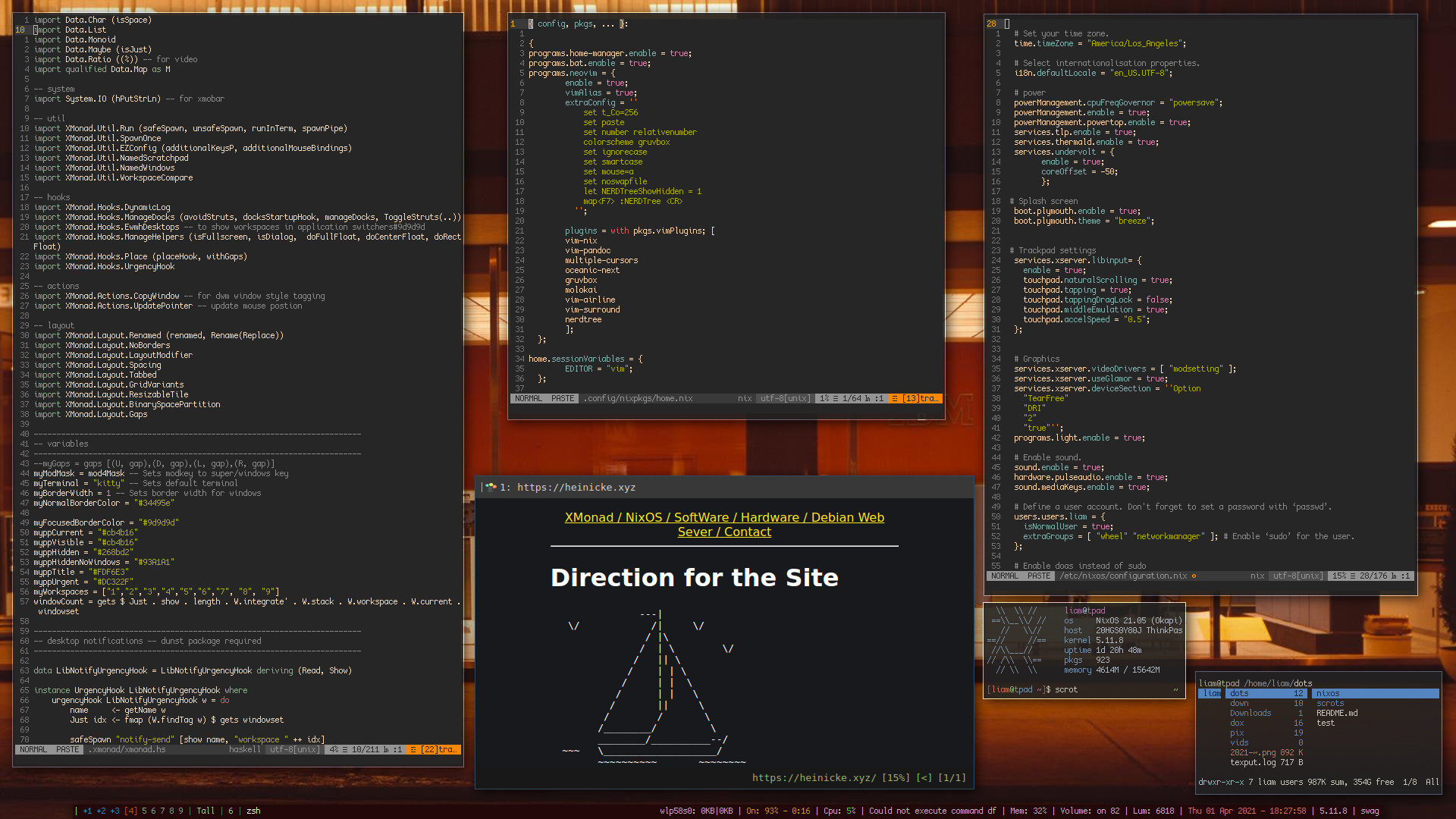
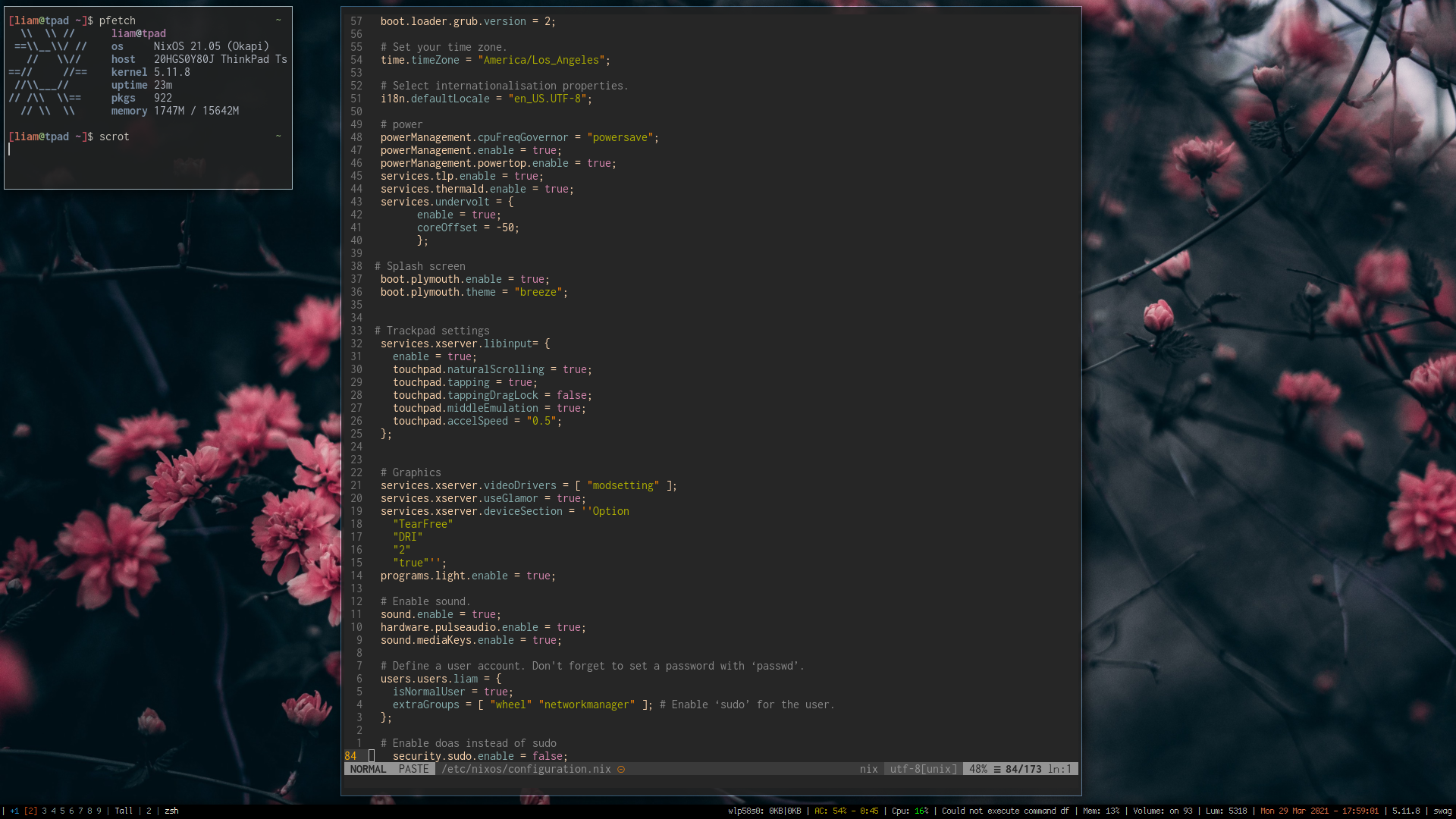
This is some XMonad on some ThinkPad.
Installation & Details
This is where things need to be improved. You can of course still copy or use these configs, though the install process is pretty diy.
git clone https://github.com/mahallow/thinkdots.git- Once this is downloaded, move everything into your home folder
~/.and make sure the layout matches the structure on Github - Some folders can be disregarded, such as the nixos folder as that has the configuration to build a matching NixOS system from the ground up, which you can do if you want by going to NixOS Install
At this point you will have a functional copy of my XMonad dots! To get anything to look normal though, once you reboot you will want to clone the repo again and put everything in your ~/.home folder. Logout, back in and bam.
General Thoughts
After using AwesomeWM for such a long time it was more painful than it ever seemed worth to start over with a new grey blank screen as I would just end up frustrating myself back to the same sort of things I had going for me in AwesomeWM. That being said, Xmonad seems to make the effort worth it as it has a lot of the same ideas and concepts that it operates by, but seems to be smoother and less buggy. Not to say AwesomeWM didnt work, its awesome (duh) but I definitely had it quit, freezeup, or just be strange a few times on me. XMonad seems to run smoother.
One of the issues with XMonad though is it is not the easist to go about changing things. My configuration is essentially a long list of copies and pastes from about 20 different people on GitHub and then me pruning through things that are not relevant to my computer. This works but I do have some things I cannot sort out that it does, like no gaps on workspaces with one window, and it is not as easy as with Awesome to work backwards. I have actually got the spaces to work by sort of shoe-horning in parts of configs I knew worked. Thanks DT. Though I am sure this is not the most clean way but the issue is I'm not sure how to do it cleaner. I now though seem to have removed my ability to right click anywhere across the whole system, in every application?
Technical Stuffs
Wallpapers are set with Nitrogen, restored in the Xmonad.hs file on startup. I have included only the apps used to get the config working out of the box.
Also to note, you may try and edit your config and go for the classic sudo nixos-rebuid switch and find that you cannot. Not to worry, your user should be set to do administrative tasks, just with doas. Command sudo cannot be found.
There are also a few different XMobar configs included. Feel free to change between them by: 1. rm .xmonad/xmobar/xmobarrc 2. ln -s {choose one} xmobarrc 3. Then recompile/restart XMonad with mod/super + Q
Config
So, I know this is super old but for reference sake I thought I’d toss this in here. Below this is the entirety of the Xmonad.hs config file, in Haskell, which is entirely unintelegable and completely impossible to understand, but hey, its what I used for years. Below that will be my XmoBar config file because I was rather stoked on that, I wrote it almost entirely myself after slowly coming to the understanding of how to do so.
-- The Liam "I wish I was using AwesomeWM but for some reason I'm here" official XMonad config--

import XMonad hiding ( (|||) ) -- jump to layout
import XMonad.Layout.LayoutCombinators (JumpToLayout(..), (|||)) -- jump to layout
import XMonad.Config.Desktop
import System.Exit
import qualified XMonad.StackSet as W
-- data
import Data.Char (isSpace)
import Data.List
import Data.Monoid
import Data.Maybe (isJust)
import Data.Ratio ((%)) -- for video
import qualified Data.Map as M

-- system
import System.IO (hPutStrLn) -- for xmobar

-- util
import XMonad.Util.Run (safeSpawn, unsafeSpawn, runInTerm, spawnPipe)
import XMonad.Util.SpawnOnce
import XMonad.Util.EZConfig (additionalKeysP, additionalMouseBindings)
import XMonad.Util.NamedScratchpad
import XMonad.Util.NamedWindows
import XMonad.Util.WorkspaceCompare

-- hooks
import XMonad.Hooks.DynamicLog
import XMonad.Hooks.ManageDocks (avoidStruts, docksStartupHook, manageDocks, ToggleStruts(..))
import XMonad.Hooks.EwmhDesktops -- to show workspaces in application switchers#9d9d9d
import XMonad.Hooks.ManageHelpers (isFullscreen, isDialog,  doFullFloat, doCenterFloat, doRectFloat)
import XMonad.Hooks.Place (placeHook, withGaps)
import XMonad.Hooks.UrgencyHook

-- actions
import XMonad.Actions.CopyWindow -- for dwm window style tagging
import XMonad.Actions.UpdatePointer -- update mouse postion

-- layout
import XMonad.Layout.Renamed (renamed, Rename(Replace))
import XMonad.Layout.NoBorders
import XMonad.Layout.LayoutModifier
import XMonad.Layout.Spacing
import XMonad.Layout.Tabbed
import XMonad.Layout.GridVariants
import XMonad.Layout.ResizableTile
import XMonad.Layout.BinarySpacePartition
import XMonad.Layout.Gaps

------------------------------------------------------------------------
-- variables
------------------------------------------------------------------------
--myGaps = gaps [(U, gap),(D, gap),(L, gap),(R, gap)]
myModMask = mod4Mask -- Sets modkey to super/windows key
myTerminal = "kitty" -- Sets default terminal
myBorderWidth = 0 -- Sets border width for windows
myNormalBorderColor = "#34495e"

myFocusedBorderColor = "#9d9d9d"
myppCurrent = "#cb4b16"
myppVisible = "#cb4b16"
myppHidden = "#268bd2"
myppHiddenNoWindows = "#93A1A1"
myppTitle = "#FDF6E3"
myppUrgent = "#DC322F"
myWorkspaces = ["1","2","3","4","5","6","7", "8", "9"]
windowCount = gets $ Just . show . length . W.integrate' . W.stack . W.workspace . W.current . windowset

------------------------------------------------------------------------
-- desktop notifications -- dunst package required
------------------------------------------------------------------------

data LibNotifyUrgencyHook = LibNotifyUrgencyHook deriving (Read, Show)

instance UrgencyHook LibNotifyUrgencyHook where
    urgencyHook LibNotifyUrgencyHook w = do
        name     <- getName w
        Just idx <- fmap (W.findTag w) $ gets windowset

        safeSpawn "notify-send" [show name, "workspace " ++ idx]

------------------------------------------------------------------------
-- Startup hook
------------------------------------------------------------------------

myStartupHook = do
      spawnOnce "nitrogen --restore &"
      spawnOnce "xmodmap ~/.Xmodmap"

------------------------------------------------------------------------
-- layout
------------------------------------------------------------------------
-- spacing maybe?
mySpacing :: Integer -> l a -> XMonad.Layout.LayoutModifier.ModifiedLayout Spacing l a
mySpacing i = spacingRaw False (Border i i i i) True (Border i i i i) True
mySpacing' :: Integer -> l a -> XMonad.Layout.LayoutModifier.ModifiedLayout Spacing l a
mySpacing' i = spacingRaw True (Border i i i i) True (Border i i i i) True
-- end spacing
myLayout = avoidStruts (tiled ||| grid ||| bsp ||| simpleTabbed2)
  where
     -- tiled
     tiled = renamed [Replace "Tall"]
	   $ mySpacing 6
           $ ResizableTall 1 (3/100) (1/2) []

     -- grid
     grid = renamed [Replace "Grid"]
          $ spacingRaw True (Border 10 0 10 0) True (Border 0 10 0 10) True
	  $ mySpacing 15
          $ Grid (16/10)
     -- bsp
     bsp = renamed [Replace "BSP"]
	 $ mySpacing 8
         $ emptyBSP

     simpleTabbed2 = renamed [Replace "tab"]
	$ mySpacing 8
	$ simpleTabbed


     -- The default number of windows in the master pane
     nmaster = 1

     -- Default proportion of screen occupied by master pane
     ratio   = 1/2

     -- Percent of screen to increment by when resizing panes
     delta   = 3/100

------------------------------------------------------------------------
-- Window rules:
------------------------------------------------------------------------

myManageHook = composeAll
    [ className =? "mpv"            --> doRectFloat (W.RationalRect (1 % 4) (1 % 4) (1 % 2) (1 % 2))
    , className =? "Gimp"           --> doFloat
    , className =? "nitrogen"       --> doFloat
    , className =? "Firefox" <&&> resource =? "Toolkit" --> doFloat -- firefox pip
    , resource  =? "desktop_window" --> doIgnore
    , resource  =? "kdesktop"       --> doIgnore
    , isFullscreen --> doFullFloat
    ]

------------------------------------------------------------------------
-- Key bindings. Add, modify or remove key bindings here.
------------------------------------------------------------------------

myKeys =
    [("M-" ++ m ++ k, windows $ f i)
        | (i, k) <- zip (myWorkspaces) (map show [1 :: Int ..])
        , (f, m) <- [(W.view, ""), (W.shift, "S-"), (copy, "S-C-")]]
    ++
    [("S-C-a", windows copyToAll)   -- copy window to all workspaces
     , ("S-C-z", killAllOtherCopies)  -- kill copies of window on other workspaces
     , ("M-a", sendMessage MirrorExpand)
     , ("M-z", sendMessage MirrorShrink)
     , ("M-s", sendMessage ToggleStruts)
     , ("M-f", sendMessage $ JumpToLayout "Full")
     , ("M-t", sendMessage $ JumpToLayout "Tall")
     , ("M-g", sendMessage $ JumpToLayout "Grid")
     , ("M-b", sendMessage $ JumpToLayout "BSP")
     , ("M-,", spawn "rofi -show drun") -- rofi
     , ("M-e", sendMessage $ ToggleGaps)  -- toggle all gaps

     , ("M-;", spawn "kitty") -- rofi
     , ("M-u", spawn "kitty ranger") -- ranger
     , ("M-o", spawn "qutebrowser") -- rofi
     , ("M-S-l", spawn "i3lock-fancy-rapid 8 3") -- lockscreen
     , ("<XF86MonBrightnessUp>", spawn "brightnessctl -d intel_backlight set +300") -- rofi
     , ("<XF86MonBrightnessDown>", spawn "brightnessctl -d intel_backlight set 300-") -- rofi
     , ("<XF86AudioLowerVolume>", spawn "amixer set Master 5%- unmute") -- rofi
     , ("<XF86AudioRaiseVolume>", spawn "amixer set Master 5%+ unmute") -- rofi
     , ("<XF86AudioMute>", spawn "amixer sset Master toggle") -- rofi
     , ("<XF86AudioMicMute>", spawn "amixer sset Capture toggle") -- rofi
     , ("S-M-t", withFocused $ windows . W.sink) -- flatten floating window to tiled
    ]

------------------------------------------------------------------------
-- main
------------------------------------------------------------------------

main = do
    xmproc0 <- spawnPipe "xmobar -x 0 ~/.xmonad/xmobar/xmobarrc"
    xmproc1 <- spawnPipe "/usr/local/bin/xmobar -x 1 ~/.xmonad/xmobar/xmobarrc"
    xmonad $ withUrgencyHook LibNotifyUrgencyHook $ ewmh desktopConfig
        { manageHook = manageDocks <+> myManageHook <+> manageHook desktopConfig
        , startupHook        = myStartupHook
        , layoutHook         = myLayout
        , handleEventHook    = handleEventHook desktopConfig
        , workspaces         = myWorkspaces
        , borderWidth        = myBorderWidth
        , terminal           = myTerminal
        , modMask            = myModMask
        , normalBorderColor  = myNormalBorderColor
        , focusedBorderColor = myFocusedBorderColor
        , logHook = dynamicLogWithPP xmobarPP
                        { ppOutput = \x -> hPutStrLn xmproc0 x >> hPutStrLn xmproc1 x
                        , ppCurrent = xmobarColor myppCurrent "" . wrap "[" "]" -- Current workspace in xmobar
                        , ppVisible = xmobarColor myppVisible ""                -- Visible but not current workspace
                        , ppHidden = xmobarColor myppHidden "" . wrap "+" ""   -- Hidden workspaces in xmobar
                        , ppHiddenNoWindows = xmobarColor  myppHiddenNoWindows ""        -- Hidden workspaces (no windows)
                        , ppTitle = xmobarColor  myppTitle "" . shorten 80     -- Title of active window in xmobar
                        , ppSep =  "<fc=#586E75> | </fc>"                     -- Separators in xmobar
                        , ppUrgent = xmobarColor  myppUrgent "" . wrap "!" "!"  -- Urgent workspace
                        , ppExtras  = [windowCount]                           -- # of windows current workspace
                        , ppOrder  = \(ws:l:t:ex) -> [ws,l]++ex++[t]
                        } >> updatePointer (0.25, 0.25) (0.25, 0.25)
          }
          `additionalKeysP` myKeys
Here is the more simple XmoBar config:
Config {
-- Set font and default foreground/background colors. Note that
-- the height of xmobar is controlled by the font you use.
font = "xft:CozetteVector-9",
bgColor = "black",
fgColor = "grey",
position = TopW L 100,
commands = [
	-- Gather and format CPU usage information.
	-- If it's above 70%, we consider it high usage and make it red.
	Run Cpu [
	"-L", "3",
	"-H", "70",
	"--normal", "green",
	"--high","red"
	]
	100,

	Run Network "enp0s31f6" ["-L","0","-H","32","--normal","green","--high","red"] 10,
	Run Network "wlp58s0" ["-L","0","-H","32","--normal","green","--high","red"] 10,


	-- Gather and format memory usage information
	Run Memory [
	"-t","Mem: <usedratio>%"
	] 100,

	-- Date formatting
	--Run Date "%k:%M:%S" "date" 10,
	Run DateZone "%a %d %b %Y - %H:%M:%S" "us_EN.UTC-8" "UTC" "date" 10,

	-- Battery information. This is likely to require some customization
	-- based upon your specific hardware. Or, for a desktop you may want
	-- to just remove this section entirely.
	Run Battery [
	"-t", "<acstatus>: <left>% - <timeleft>",
	"--",
	--"-c", "charge_full",
	"-O", "AC",
	"-o", "Bat",
	"-h", "green",
	"-l", "red"
	] 100,

	Run Com "echo" ["swag"] "note" 0,
	Run Com "volume" [""] "vol" 10,
	Run Com "date" [""] "time" 10,
	Run Com "uname" ["-r"] "kernal" 0,
	--Brightness
	Run Com "brightnessctl" ["-d", "intel_backlight", "g"]  "mybright" 60,
	-- This line tells xmobar to read input from stdin. That's how we
	-- get the information that xmonad is sending it for display.
	Run StdinReader
],

-- Separator character used to wrape variables in the xmobar template
sepChar = "%",

-- Alignment separater characer used in the xmobar template. Everything
-- before this will be aligned left, everything after aligned right.
alignSep = "}{",

-- Overall template for the layout of the xmobar contents. Note that
-- space is significant and can be used to add padding.
template = "| %StdinReader% }{ %enp0s31f6%%wlp58s0% | <fc=#c5a900>%battery%</fc> | %cpu% | %memory% | Volume: %vol% | Lum: %mybright% | <fc=#e6744c>%date%</fc> | %kernal% | %note% "
}
Thats it for now!
LH
Donate:ETH: 0xce7f5fbcc643c1a620f8176bcad4ad0679e0c537
BTC: 3Nme6AnFahGqJRWp5rGjVptL6NjpzLLgCi
XMR: 485NFguWDS7NpaqtQdcxunMcexVVyhRJ4LyMuD5FedjZaGJL29vwAh9BAdgTkWjkSKcUx43cHEQVbeK3QEV9fDRd3RYZiZr